
The times in the time report can be green, orange, or black.
Green = Clocked time.
Orange = Time that is allocated by the system. For example, this may refer to a break scheduled according to the daily schedule's rules.
Black = Manually registered time.
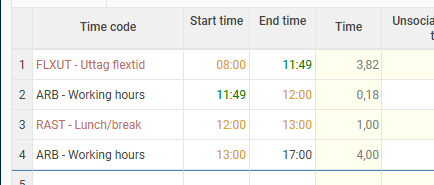
In the image below, a time clocking has taken place at 11:49.
Absence has been set out by the system until clock-in, which makes the 08:00 time orange. The times for breaks are also orange since the system has assigned them; the break has not been clocked. The end time 17:00 has not been clocked but entered manually and is therefore black.
Please note: This article is AI-translated. This means that linguistic errors or misunderstandings may occur.