
It is possible to show balances in the absence manager. For example, you can display the comp balance when applying for comp leave, so you can see how much time there is available to take out. You can also block an application at a certain balance value, to avoid accidentally taking out too much. If the absence reason Comp leave is blocked at a balance value of 0 and you have three hours in your comp balance, you will not be able to submit an application for absence exceeding three hours.
Example
In the example below, Employee 5 has three hours of outgoing comp in August, but still cannot save an application for one hour on 19 August.
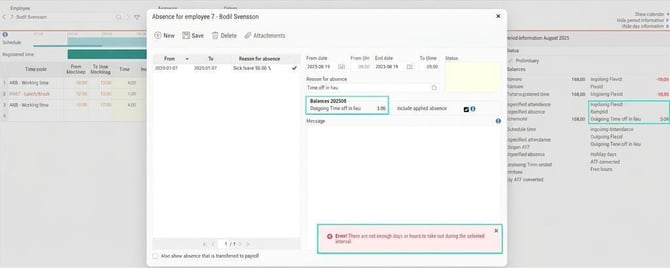
This is because the three hours of outgoing comp have been entered via a balance adjustment. The balance adjustment increases the outgoing value by three hours. Because it concerns the outgoing value, it does not apply until the end of 31 August, which means you cannot use it on 19 August.
If the balance adjustment had increased the ingoing value by three hours, it would have been possible to use these hours on 19 August.
The same applies when accruing value to the balance during the period. If you have an event for ATF that adds a value on the last day of the period, you cannot use this for leave during the same period. Since the event sets the period's outgoing value, you can use it only in coming periods.
On the tab Allowances you can see on which date an event has been triggered.
Please note: This article is AI-translated. This means that linguistic errors or misunderstandings may occur.