
In HRM Time, breaks are controlled by specific rules in the day schedule. These rules determine when during the day you can take a break and how clockings should be interpreted.
For example, let’s take a day schedule with working time from 08:00 to 17:00 and a break from 12:00 to 13:00. The break is set with a break window from 11:30 to 13:30. This means that any clocking out made between 11:30 and 13:30 will be treated as a break, and you are allowed to take your break at any time between 11:30 and 13:30. If you take a break between 10:00 and 11:00, unspecified absence will be generated, as it is not within a break window.
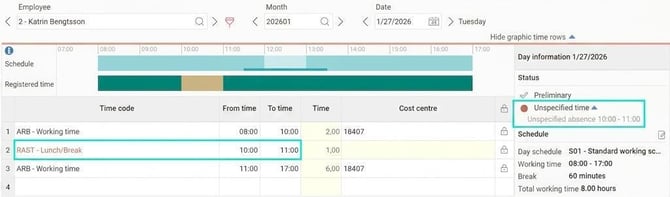
When is unspecified absence not generated?
There are three common reasons why the system does not create unspecified absence even though the break is discrepant:
-
Setting on the time code: The time code for break may be configured not to generate unspecified absence.
The setting is called Generate unspecified absence for unauthorised break and can be found under Settings > Time and Plan > Time Codes. -
Setting on the day schedule: The day schedule itself can have a setting that prevents unspecified time from being created.
The setting is called Generate unspecified time and can be found under Settings > Time and Plan > Schedules > Day schedules -
Overlap with the break window: If any part of your break occurs within the break window, no unspecified absence will be generated for the break. This applies even if the majority of the break falls outside the window.
Example:
Your break window starts at 11:30 and you take your break from 11:00 to 12:00. You will not receive unspecified absence. This is because the last half hour is within the break window.
Tip: Discrepancy for discrepant break
Even if the system does not generate unspecified absence, you can configure it to display a discrepancy in the time report for 'discrepant break'. This appears when the break is outside the break window, even if part of the break is within the window.
Discrepancies can be configured per company, per time group, or per employee.
Please note: This article is AI-translated. This means that linguistic errors or misunderstandings may occur.