
Authentication Settings
Authentication Settings is a self-service portal where you, as an administrator, can manage and configure Single Sign-On (SSO) and verify your domain.
If you are an administrator in Flex HRM, you can assign authorisation for Authentication Settings under General > Security in Flex HRM.
NOTE - the person being granted authorisation must have an email address verified in Visma Connect 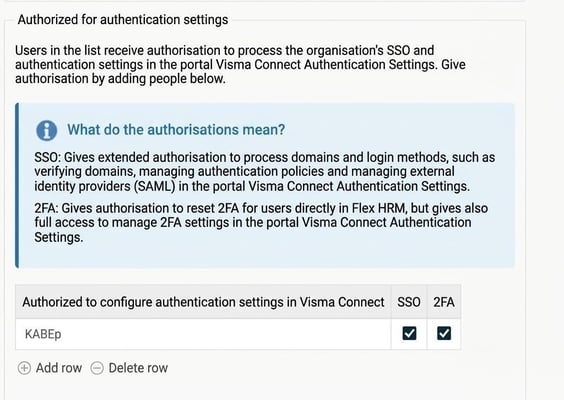
So, if you want to grant authorisation to IT staff, for example, click “Add row” as shown in the image above and search for the user you want to grant authorisation to. Then click “Save” in the top left-hand corner.
Bear in mind that if you want authorisation for Authentication Settings yourself, you also need to grant it to your own account.
You can access Authentication Settings using the following link: https://authenticationsettings.connect.visma.com
For more detailed information about Authentication Settings, see the documentation at the following link: https://docs.connect.visma.com/docs/authentication-settings
Verify domain
For the feature to work, you need to verify your domain in Authentication Settings. You can do this by following the guide at the following link: https://docs.connect.visma.com/docs/domains
Once everything is ready, you can see which domains have been verified in HRM

Please note: This article is AI-translated. This means that linguistic errors or misunderstandings may occur.