
Skip to content
English
  • There are no suggestions because the search field is empty.

⚙️What settings in HRM are required for registered part-time absence in HRM Time to be correct in HRM Payroll?

This article is primarily intended for customers using Flex HRM Time with Flex HRM Payroll. If another payroll system is being used, the settings are determined by that system's capability to process absence part time. Pay attention to absence part time, especially in combination with other absence, as the handling may differ depending on the payroll system. Absence part time refers to periods with temporarily reduced schedule time due to leave of absence or a medical certificate. Occasional sick days or part of a day are not counted as absence part time. During the sick unsocial working hours period, absence part time should not be used. It should only be reported after the first 14 days in cases of long-term sick leave.

How to specify part-time absence percentage for employees in HRM Payroll

1. Open the Employee register.

2. Specify the part-time absence percentage (e.g. 20 for 20% absence) under the Payroll tab.
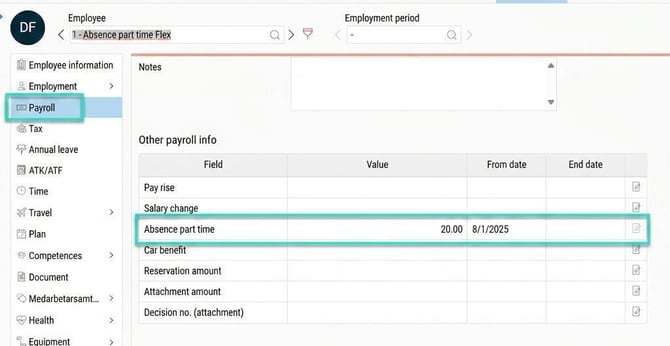
3. The system automatically retrieves the percentage for calculations in pay codes, for example for holiday deductions. This means that the holiday deduction is reduced if sick pay is deducted on the same day. Use the formula according to the instructions below.

image-png-Aug-18-2025-01-03-03-7608-PM


Tip: Do you want to read about other settings in the system that relate to absence part time then click here.


Please note: This article is AI-translated. This means that linguistic errors or misunderstandings may occur.