
Temporary lending can be used so that, in the time report, you can specify one or more account codes that, for a selected date interval, should be applied to the time rows. For example, it might usually be the case that the home cost centre is applied to the time rows. Now, you do not want to change the home cost centre, but instead be lent out for a few days. To avoid the manual work of updating all time rows, you can instead specify the temporary cost centre under Temporary lending, and it will be applied in the time report during the time interval you have specified.
You activate temporary lending for one or more account code levels under Settings > General > Account Code Dimensions > Time: Use for temporary lending.
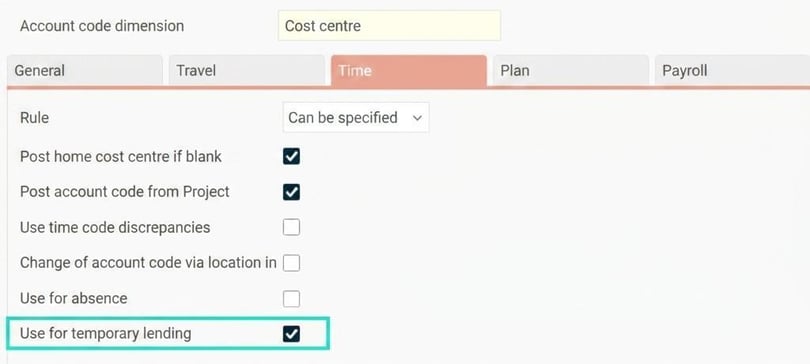
You must also grant authorisation to the users who should be able to view and specify temporary account codes. Under Users/Authorities > Roles there is Temporary lending under the nodes Time > Time reports.
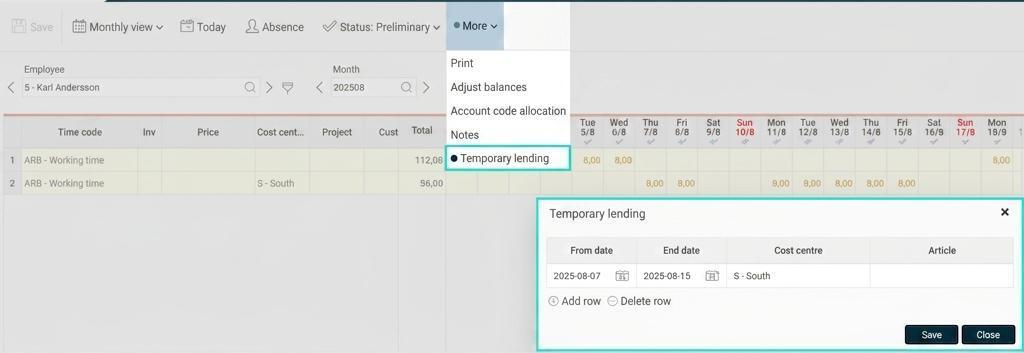
In the time report, temporary lending can be found under More. If anything is entered there for the current day/period, it is marked with a round icon as shown in the image below. The account codes you specify under Temporary lendingwill be applied in the time report, if no other account code has been specified. Temporary lending can be used for both day and period reporting.
Please note: This article is AI-translated. This means that linguistic errors or misunderstandings may occur.