
Here’s how the time report manages absence when the absence manager has overlapping absence entries:
- If there is an absence that is ROLLING (i.e. has no end date), any other absence that follows will apply.
- If there is an absence that was rolling but now has an end date, it will take precedence over other absences that it overlaps.
- If an absence is completely contained within another, the inner absence is generated. This only applies if both are full days or if both are part-days.
- If none of the above situations apply, the absence that was registered most recently is generated.
Tip:
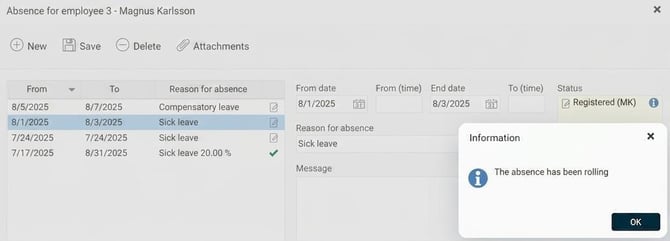
It’s possible to see if an absence has been rolling. Absence entries that were rolling but now have an end date get an info icon indicating this. The image below shows such an absence in the absence manager.
Please note: This article is AI-translated. This means that linguistic errors or misunderstandings may occur.