
Roles determine what you can see and do in Flex HRM. You may have several different roles assigned at different levels: company level, account code level, and employment level.
Specific roles take precedence over general ones
The most specific level applies. This means that a role assigned at employment level takes priority over a role at company level.
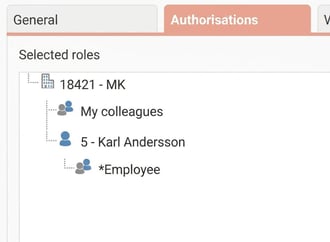
Example: If you have the role My colleagues at company level and the role Employee for your employment, it is the role Employee that applies to you. The specific role for your employment therefore overrides the general role for the entire company.
Gives My colleagues, but not Employee, authorisation for the Attendance Board means you will see your colleagues in the Attendance Board, but not yourself.
The most permissive role applies
You can assign multiple roles at the same level, for example both the role My colleagues and Employee at employment level.
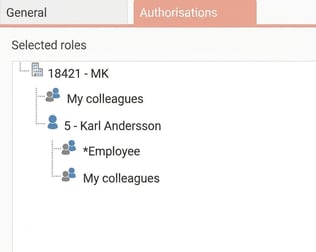
In these cases, the role that grants the most authorisation will take effect. If the role My colleagues allows you to view the Attendance Board while the role Employee does not, you will be authorised to see yourself in the Attendance Board.
Please note: This article is AI-translated. This means that linguistic errors or misunderstandings may occur.