
Are you customers of Winningtemp? You can now streamline your work even further with our smooth integration. One requirement is an active agreement with Winningtemp.
Contents
Activate Winningtemp integration
Show temperature data in HRM
Activate integration in HRM

Winningtemp & HRM Integration
The integration consists of two main parts:
- Automatic transfer of employees: Employee information is synchronised from HRM to Winningtemp. This ensures that Winningtemp always has up-to-date information and reduces duplicate work, as you only need to add employees in HRM.
W inningtemp can use the organisational structure that is set up in HRM. - Visualisation of key performance indicators: Fetch and display temperature data from Winningtemp directly in your Dashboards in HRM to provide an overall view of your key performance indicators.
Automatic transfer of employees
To enable employees to be fetched on an ongoing basis from HRM to Winningtemp, please follow the steps below.
For more information, contact Winningtemp via integrations@winningtemp.com .
Activate integration in Winningtemp
Inform Winningtemp of your company and customer number, which you will find at the bottom right when you are logged into HRM.
In the example below, 1010 is the company number and 5257 is the customer number: 
In HRM
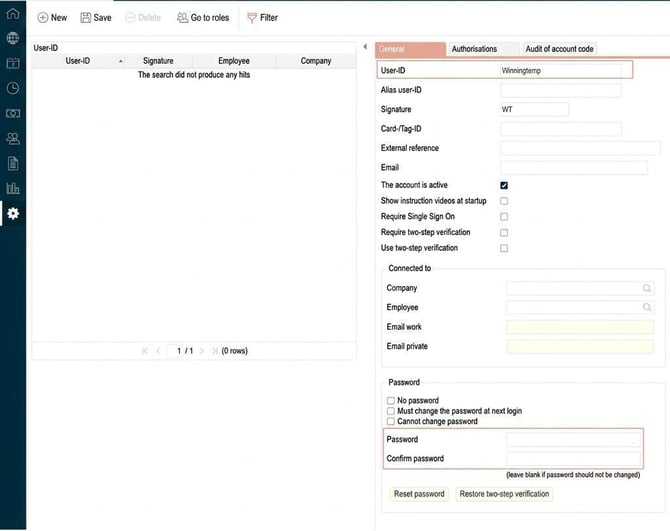
- Create an integration user specifically for Winningtemp in HRM with authorisation for HRM Api, and inform Winningtemp of the user name and password:
-
Set the role's authorisation and enable authorisation for the user.
💡As a customer, you will receive more information about how the authorisations should be set up from our Customer Delivery team. Here you will find information on how to contact the team, which can provide you with API documentation that explains the settings in Flex HRM.
Show temperature data in HRM
To display data from Winningtemp in HRM, you need to follow the steps below.
You also need to have an active account with Winningtemp.
Retrieve Client details in Winningtemp
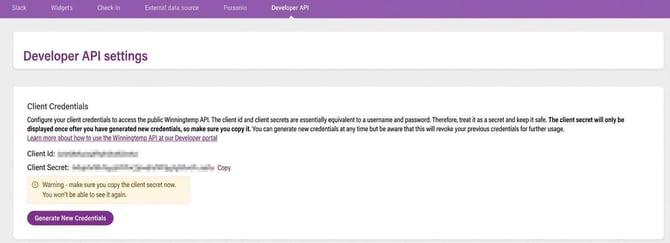
For HRM to fetch data from Winningtemp, you need to retrieve the correct Client id and Client Secret.
Log in as Administrator in Winningtemp. Remember to switch to Admin when you have logged in.
- Go to Settings - APPS - Developer API.
- Click on Generate New Credentials.
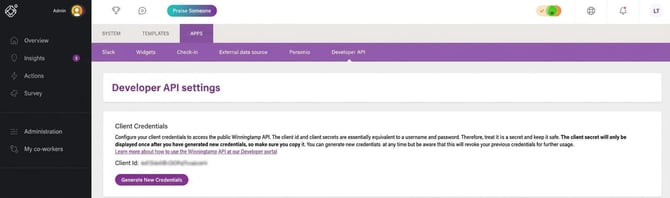
- Copy Client id and Client Secret which should be pasted into HRM’s program link for Winningtemp (see next section):
Activate integration in HRM
To activate the function, you must first enable the licence and create a program link to Winningtemp.
Log in to HRM.
-
Go to General > Company and enable the licence for Winningtemp in the current company. See the tab Licence.
- Go to Administration > Settings > Import/export > Program links.
- Choose Program link Winningtemp.
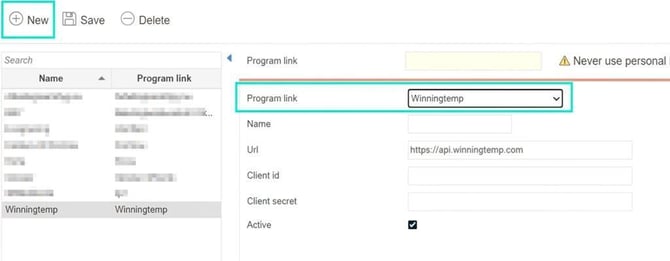
- Enter a name, e.g. Winningtemp.
- Paste Client id and Client secret which you retrieved in Winningtemp (see first section):
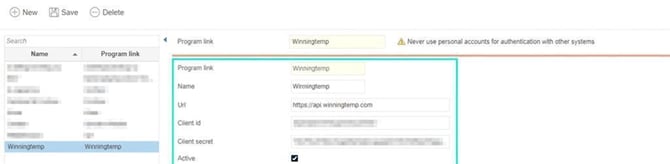
- If you want to sync the organisational structure from Flex HRM to Winningtemp, tick Get mapping from Winningtemp.
- Save.
In April 2026, the function for retrieving the organisational chart in the integration between Winningtemp and Flex HRM was updated. This means that the old mapping is no longer visible in Flex HRM.
If you have previously used the integration between Winningtemp and Flex HRM and now tick Get mapping from Winningtemp the manual mapping will disappear entirely.
Note: If you cannot get the program link to work, you may need to check the status of the Winningtemp integration under System register > Integrations.
Read more about how to create a Dashboard in HRM with Winningtemp panels.
Please note: This article is AI-translated. This means that linguistic errors or misunderstandings may occur.