
Under Actions processed there is the menu Transfer of time reports to payroll.
Important
If you use HRM Payroll, you retrieve the time reports from the payroll preparation. This article only concerns those who use a payroll system other than HRM Payroll.
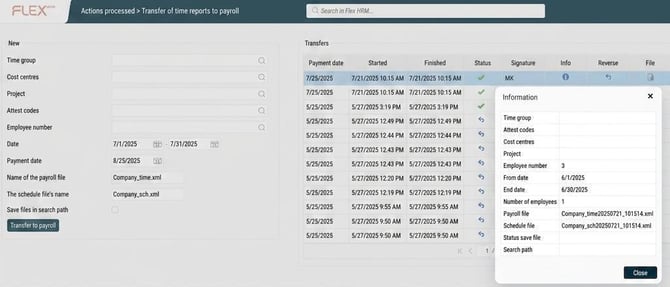
It is possible to make a selection if you do not want to transfer all employees' time reports.
Enter the start date and end date as well as the payment date.
The file is created in the file format you selected in the payroll connection settings. Usually both a schedule file and a payroll file are created, but this can vary depending on the payroll system you use. Download the files by clicking in the column File. Import the files into your payroll system. The schedule is imported first.
You can reverse and rerun payroll files. It is important that after the files have been created you click on the info icon and check that something has been created and that the number matches what you expected.
Related:
How is information from the time reports transferred to the payroll system?
Please note: This article is AI-translated. This means that linguistic errors or misunderstandings may occur.