
Handling of balance export
Once you have finished your settings for balance export, you can carry out the actual transfer of data from Payroll to HRM Time. This can be done in two ways:
-
Automatic export: The export takes place automatically directly after the payroll run is completed.
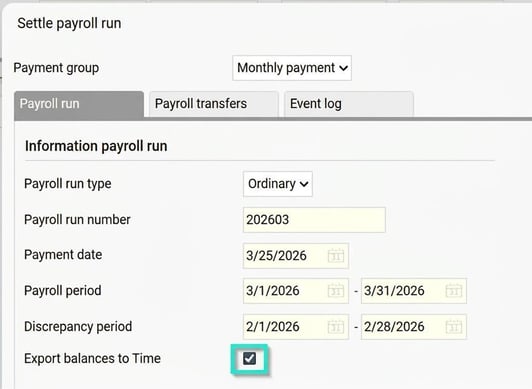
-
Manual export: You can run the export manually at any time via the menu Actions processed > Service routines > Export balances from Payroll to Time. Then select the payroll run you want to export balances from, and make any further selections, for example, for a separate employee.
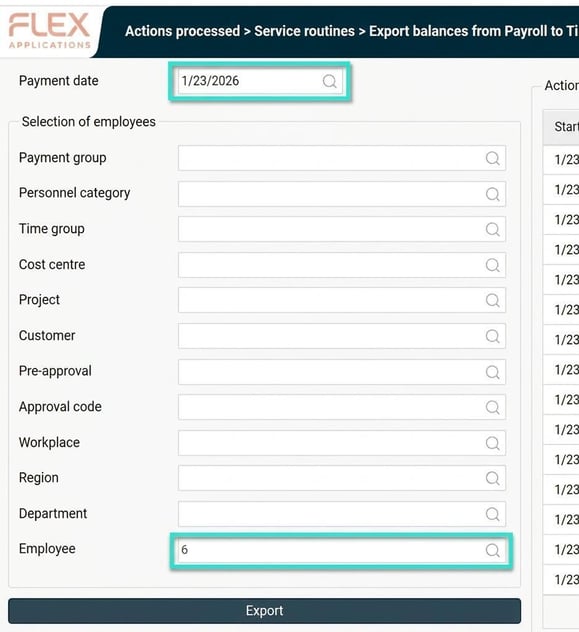
Example workflow
When you process payroll for January 2026 and choose to export balances, the ingoing balances for January’s time report in HRM Time are updated.
Which settings are required in order to export balances from HRM Payroll to HRM Time?
Please note: This article is AI-translated. This means that linguistic errors or misunderstandings may occur.