
You can find the settings via the menu Administration > Settings > Payroll > Payroll runs.
Under the tab Balance export you set which balances should be transferred from the payroll module HRM Payroll to HRM Time. This enables employees to see their current balances in the time report.
Connect balances between the systems
Here you map balances from the payroll run in HRM Payroll to the correct receiving balance in HRM Time:
-
Balance in salary: You can export either an accumulator (for example comp time, time bank, or shortening of working hours) or a balance (for example annual leave or shortening of working hours using the ATK / ATF Agreement function).
-
Balance in time: Select which balance in HRM Time should receive the value.
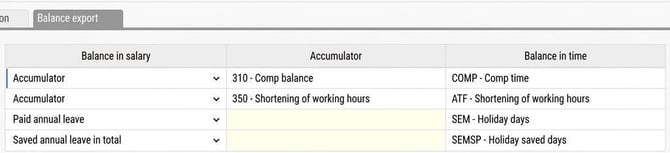
As holiday days in HRM Payroll are calculated as gross days, there are additional settings you can make to affect how the balance is viewed for the employee in HRM Time.
-
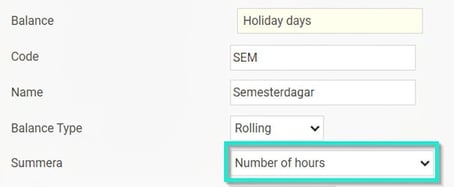
To export holiday days converted into hours, the receiving balance in HRM Time needs to be set to sum the number of hours.
-
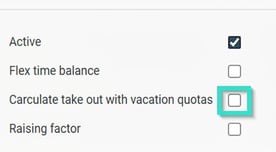
To export holiday days and in HRM Time display the net value (gross days / current vacation quota), the balance should be set not to calculate withdrawal with vacation quotas (i.e. this box should not be ticked).
-
Please note: This article is AI-translated. This means that linguistic errors or misunderstandings may occur.