
Note: This article applies to the module Flex HRM Analysis for payroll mapping which will reach End of Life on 30 June 2027.
Would you like to learn more about our new module Flex HRM Pay Equity Compass, you will find the relevant articles here.
Export
You can export the following from the payroll mapping analysis
- All works
- Submitted works
- Submitted works
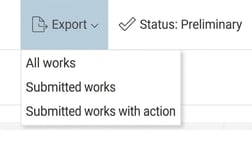
When you export, it will be provided in Excel. Here, you can view detailed information on the employees included in the payroll mapping analysis, as well as comments and submission marks from the various analysis views.

💡 Tip! If you need to recalculate the payroll mapping analysis after you have started analyses in Equivalent work or Lower salary higher valuation, it is important to know that the recalculation deletes these comments and submission marks.
Therefore, first export all works. Then you will have a list with all comments to refer back to when you need to enter them again in the analyses.
Please note: This article is AI-translated. This means that linguistic errors or misunderstandings may occur.