
Please note that making an employee anonymous cannot be undone. Once you have carried out this activity on an employee, the data cannot be restored.
Make employees anonymous
In HRM, there is a function for making employees anonymous.
General > Data purging > Make employees anonymous
With this function, you have the option to make employee information anonymous, which means that names, national ID numbers, phone numbers, addresses and other details that identify a person are changed or removed.
This may be useful when you want to remove information about the employee but do not have the possibility to delete the employee entirely. Another area of use is to make all employees anonymous in test environments to reduce the risk of exposing employee information unnecessarily.
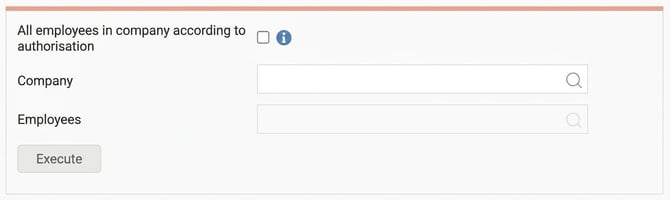
Here you can choose to either make all employees anonymous in the companies you are authorised to or do the same for a single company. If you have selected a company, you can also choose a specific employee to make anonymous. If you do not select an employee, the anonymisation will be performed for all employees in the selected company.
Please note! Once you have made this anonymous, it is not possible to undo in any way other than by restoring a backup of the entire database. Therefore, make absolutely sure the selection is correct before carrying out the anonymisation.
When using this function, the following fields will:
Be removed
email private and work
phone number
address lines
trade union
next of kin
profile image
documents on employees
staff appraisal and forms
clearing and account number as well as BIC and IBAN
Be pseudonymised
date of birth, national ID number and gender
name
children
vehicle registration number
The view is rights-controlled via Users/Authorities > Roles.
Related articles
How do I remove an employee?
How does data purging/cleaning of employee information work in HRM?
Please note: This article is AI-translated. This means that linguistic errors or misunderstandings may occur.