

Under Personnel > Employees In HRM you will find the employee register with employee information and other employment information.
Automatic removal of employee information
HRM includes an automatic function for data purging of employee information.
Automatic data purging is applied to
- Next of kin
- Bank account information
Other employee information is purged manually.
Keep in mind that if documents are uploaded to HRM you need to manage the purging manually.
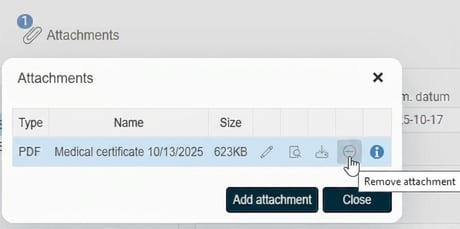
If an attachment is added to an application for absence in HRM Time, that attachment is purged along with the absence. Go to the employee’s time report, click on Absence, select the current absence and click on Attachments. Here you will find the attachment and select the icon Remove attachment.
Deletion of employee information – Settings
With this function, an employee's information is automatically removed after an employment has ended. This is performed as a background job shortly before midnight each day.
Deletion is performed for all employees meeting the following criteria.
- do not have an active employment period today
- have terminated their employment 90 days ago or more and do not have any upcoming employment periods.
The function applies at system level and cannot be turned off. However, the time frame can be changed under Administration > General > Data purging > Deletion of personal data > Settings.
The default time frame is 90 days. It can be set manually in the column Field to any number between 0–999 days. Zero means the information is deleted at the end of the last day of the employment. In the view, the person who last changed the setting is logged by means of the point in time and user appearing in the column for Last changed.
The view is controlled by authorisations via Users/Authorities > Roles.
Deletion of the information is logged under Settings > General > Logging > Log, Employee register provided the log is enabled. The log displays the previous value and notes that the deletion was carried out by the system, i.e. not by a user.
Please note that the function is only available if Flex HRM Employee is included in your program version.
Related articles
How do I delete an employee?
How does make employees anonymous in HRM work?
Please note: This article is AI-translated. This means that linguistic errors or misunderstandings may occur.