
Please note that this function is only available with home country Norway.
Read the article ⚙️How do I set up a connection to retrieve sick leave via Altinn? for information on how to set up a program link for integration with Altinn.
Sick leave from Altinn
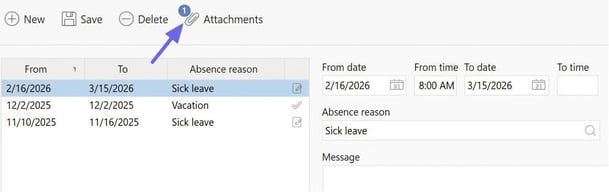
Once you have set up the program link, Flex HRM receives information when digital sick leave is available via Altinn and creates a sick leave record for the employee. The absence will then appear in the employee's absence manager, and the sick note can be viewed as an attachment there. The message history in the absence manager showsthat the absence has been retrieved from Altinn.
Now the absence is audited, Flex HRM sends back information about who is the employee’s immediate manager, if NAV has requested the immediate leader. If the absence is not set to require audit, it is considered audited immediately.
You can check who is the immediate manager in the employee register under the tab Employment.
If you use settings for reminders to be sent when an absence is registered or an application for absence is made, these will also be sent when the absence comes from Altinn.
Remember to set authorisation for which roles should have the right to see attachments in the absence manager.
Log
Under Settings > Import/export > Program links you can select the program link for Altinn and click on Log. There you can see the communication that has taken place as well as any error messages.
Please note: This article is AI-translated. This means that linguistic errors or misunderstandings may occur.