
Annual leave agreement
If the holiday increment is to be paid once a year, make settings via Settings > Payroll > Annual leave agreement, the tab Vacation debt.
Here you specify whether only one of the holiday increments or both should be paid once a year, and in which month the payment should occur.
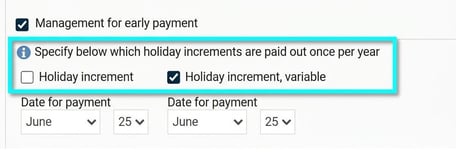
Please note that this setting affects the vacation debt, but it will not generate a payment.
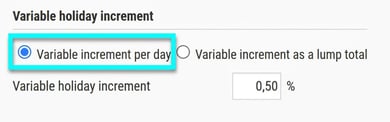
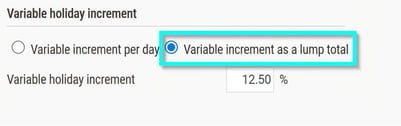
If there are variable increments, specify how they are paid under the tab General:
- Per day: Select the option Variable increment per day.
- As a lump total: Select the option Variable increment as a lump total.
Pay codes
When the holiday increment is paid once a year, the pay code for the holiday increment should not be generated from pay codes for annual leave. Here is an example of how pay code 510, holiday pay, and pay code 511, holiday deduction, are generated from pay code 501, Paid annual leave:

Check that the pay codes you use retrieve the correct holiday increment:
- The pay code for holiday increment 0.8% (or the percentage your collective agreement specifies):
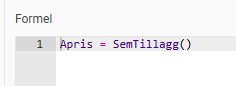
- The pay code for variable holiday increment:
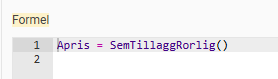
- In payroll preparation, specify the amount to be paid out.
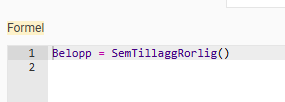
- If you pay out the variable holiday increment as a lump total, the formula may instead look like this:
Import file
To simplify registration, you can import a file to payroll preparation. You can read how to do this here.
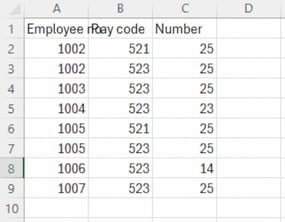
Example of how an Excel file might look if you are to pay both the regular and the variable holiday increment (not as a lump total). In the example below, we import pay code 521, Variable holiday increment, and pay code 523, Holiday increment one-time payment:
Please note: This article is AI-translated. This means that linguistic errors or misunderstandings may occur.