
Bank files in ISO 20022 format in Flex HRM Payroll
Background
In the coming years, banks will phase out Bankgiro’s old systems and files for wage payments, such as KI and LB. They will be replaced by a new payment platform handling XML files according to the ISO 20022 format, Pain.001, which is a global standard. During the transition period, all companies using Bankgirocentralen’s old files will gradually need to change file format for wage payments in consultation with their respective banks.
The various banks have progressed differently in the transition to the new file format, with some already having a ready-made service and others just beginning their work to develop a solution. Banks with a ready service often send notifications to their customers and communicate in different ways that the switch to the new format is needed soon. Banks can, however, retain support for Bankgirocentralen’s files until they are completely phased out.
Support for tailored files and a general ISO file
Although the new format uses the ISO 20022 standard and the banks are cooperating, in practice the different banks will require slightly different contents in the file. This means that, as a payroll system provider, we cannot build a solution that works for all banks (as with Bankgirocentralen’s files), but instead need to build a separate file for each bank. To create the most flexible solution possible, we have, in addition to the tailored files for each bank, developed support for a general ISO file where the file structure can be selected via settings. However, this requires a deep understanding of the ISO format and a dialogue with the relevant bank.
Which banks will Flex offer support for?
These banks are supported in Flex HRM Payroll:
- Danske Bank (updated in version 2026.154)
- Handelsbanken
- Nordea
- SEB (update in version 2025.231)
- J.P. Morgan (from version 2022.6)
- BNP Paribas (update in version 2026.122)
- DNB (update in version 2026.137)
- Swedbank (from version 2025.79)
- CitiBank (update in version 2026.119)
We are in dialogue with the following banks, but they currently do not have a completed service for the new ISO format or lack support in Flex HRM Payroll:
- Ica Banken
- Länsförsäkringar
- Svea Bank
Settings in Flex HRM Payroll
Below you will find information about the settings and important considerations for the banks we support in Flex HRM Payroll. These settings can be found under Administration > Settings > Payroll > Payment of salary.
Click the links below to access information about each bank:

Danske Bank
Handelsbanken
Nordea
SEB
Swedbank
JPMorgan
BNP Paribas
DNB
General file
Danske Bank
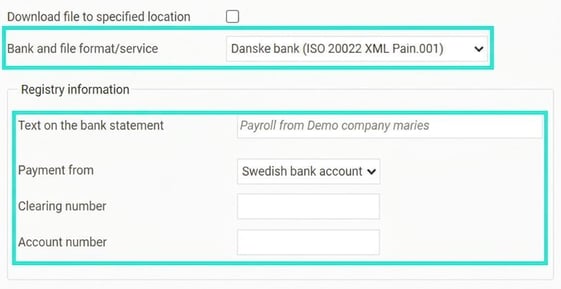
Select Danske Bank (ISO 20022 XML Pain.001) as Bank and file format/service as shown below.
Text on the bank statement
Here you can choose which text will appear on the employee’s bank statement. Please note that this will not work fully until Bankgirocentralen’s new payment infrastructure is in place and the bank supports this feature. Contact your bank for more information.
From which account should the salary be paid?
If you pay via Danske Bank, you can choose to specify a Swedish bank account number (Clearing number and Bank account number), or an IBAN-number.
Identification with the bank
To enable the bank to identify who is sending the file for wage payment, the company registration number is included in the file (InitiatingParty – Id field). You do not need to make any setting for this.
Handelsbanken
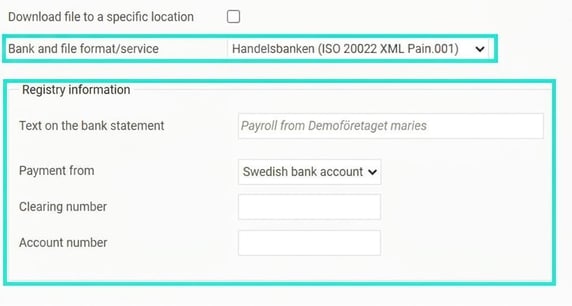
Select Handelsbanken (ISO 20022 XML Pain.001) as Bank and file format/service as shown below.
Text on the bank statement
Here you can choose which text will appear on the employee’s bank statement. Please note that this will not work fully until Bankgirocentralen’s new payment infrastructure is in place and the bank supports this feature. Contact your bank for more information.
From which account should the salary be paid?
If you pay via Handelsbanken, you can choose to specify a Swedish bank account number (Clearing number and Bank account number), or an IBAN-number.
Identification with the bank
To enable the bank to identify who is sending the file for wage payment, the company registration number is included in the file (InitiatingParty – Id and Debtor - Id fields). You do not need to make any setting for this.
Nordea
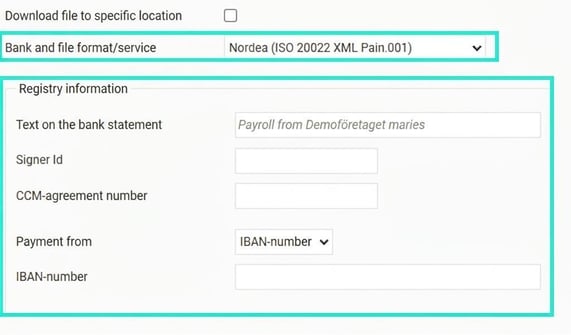
Select Nordea (ISO 20022 XML Pain.001) as Bank and file format/service as shown below.
Text on the bank statement
Here you can choose which text will appear on the employee’s bank statement. Please note that this will not work fully until Bankgirocentralen’s new payment infrastructure is in place and the bank supports this feature. Contact your bank for more information.
From which account should the salary be paid?
If you pay via Nordea, you can choose to specify a PlusGiro account or an IBAN-number.
Identification with the bank
Depending on how you transfer the file to Nordea, you need to specify different information for the bank to identify who is sending the file for wage payment. If you use Corporate Access you should enter your CCM agreement number (which will be included in the file in the Debtor - Id field) as well as your Signer Id (which will be included in the file in the InitiatingParty – Id field).
If you do not use Corporate Access, you can instead choose to enter 9999999999 (ten nines) in both these fields.
SEB
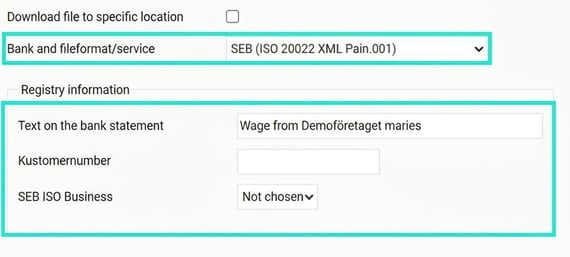
Select SEB ISO Salary LB as Bank and file format/service as shown below.
Text on the bank statement
Here you can choose which text will appear on the employee’s bank statement. Please note that this will not work fully until Bankgirocentralen’s new payment infrastructure is in place and the bank supports this feature. Contact your bank for more information.
From which account should the salary be paid?
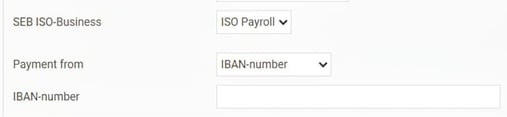
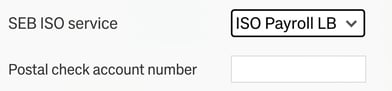
SEB has two different ISO services for payment, ISO Salary and ISO LB. The created file will look slightly different depending on which service you have, with one difference being how you specify which account the salaries are paid from.
If you use the ISO Salary service, you should specify either a Swedish bank account number (clearing number and bank account number) or an IBAN.
If you use the ISO LB service, a Postal check account number is specified as the account from which wages are paid.
Identification with the bank
To enable the bank to identify who is sending the file for wage payment, you need to specify the customer number you received from SEB. This customer number usually consists of the company registration number + 0004. This customer number is included in the file in the Debtor – Id field.
Swedbank
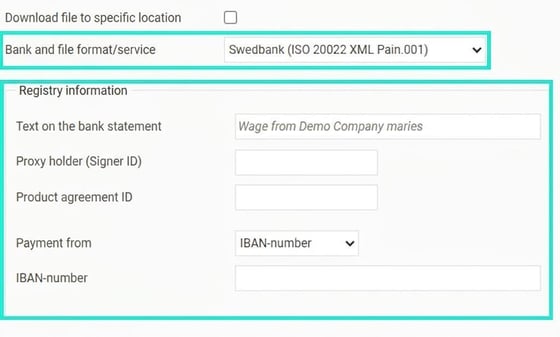
Select Swedbank (ISO 20022 XML Pain.001) as Bank and file format/service as shown below.
Identification with the bank
To enable the bank to identify who is sending the file for wage payment, you need to specify a Signer ID that you have received from Swedbank (included in the file in the InitiatingParty – Id field). You also need to specify a Product agreement ID (included in the file in the Debtor - Id field)
Text on the bank statement
Here you can choose which text will appear on the employee’s bank statement. Please note that this will not work fully until Bankgirocentralen’s new payment infrastructure is in place and the bank supports this feature. Contact your bank for more information.
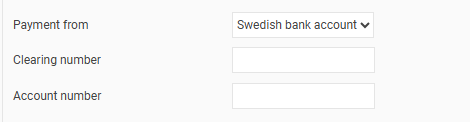
From which account should the salary be paid?
If you pay via Swedbank, you can choose to specify a Swedish bank account number (Clearing number and Bank account number), or an IBAN-number.
J P Morgan
Select JP Morgan (ISO 20022 XML Pain.001) as Bank and file format/service as shown below.
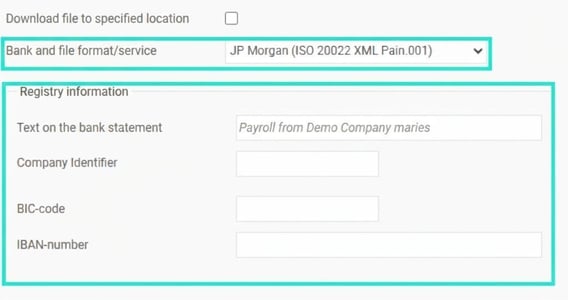
Text on the bank statement
Here you can choose which text will appear on the employee’s bank statement. Please note that this will not work fully until Bankgirocentralen’s new payment infrastructure is in place and the bank supports this feature. Contact your bank for more information.
From which account should the salary be paid?
If you pay via JP Morgan, specify the IBAN-number as well as the BIC-code the wages are to be paid from.
Identification with the bank
To enable the bank to identify who is sending the file for wage payment, you need to specify a Company Identifier you have received from JP Morgan (included in the file in the Debtor – Id field). In addition, the company registration number is entered in the file (included in the InitiatingParty – Id field).
BNP Paribas
Select BNP Paribas (ISO 20022 XML Pain.001) as Bank and file format/service as shown below.
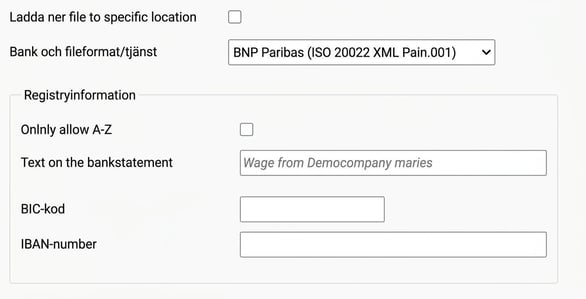
Only allow A-Z
If this setting is activated, texts (names and addresses etc. for companies and employees) will only contain the characters a-z (capital and lower case), numbers 1-9, spaces and underscores. Any invalid characters will be replaced by valid characters. For example, å and ä are replaced by a, and ö by o.
Text on the bank statement
Here you can choose which text will appear on the employee’s bank statement. Please note that this will not work fully until Bankgirocentralen’s new payment infrastructure is in place and the bank supports this feature. Contact your bank for more information.
From which account should the salary be paid?
If you pay via BNP Paribas, specify the IBAN-number as well as the BIC-code the wages are to be paid from.
DNB
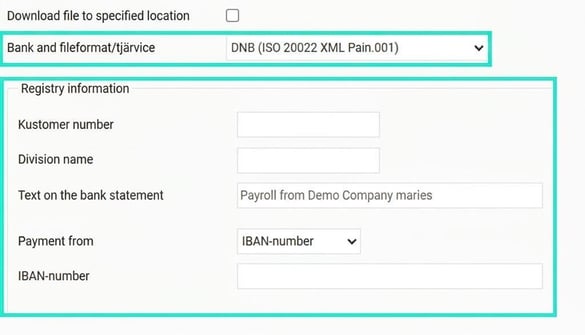
Select DNB (ISO 20022 XML Pain.001) as Bank and file format/service as shown below.
Identification with the bank
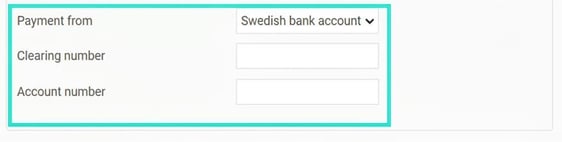
To enable the bank to identify who is sending the file for wage payment, you need to specify a Customer number you have received from DNB (included in the file in the InitiatingParty – Id field).
If you have received a divisjonsnavn from DNB, you should specify this in this field (included in a second field for InitiatingParty – Id in the file).
Text on the bank statement
Here you can choose which text will appear on the employee’s bank statement. Please note that this will not work fully until Bankgirocentralen’s new payment infrastructure is in place and the bank supports this feature. Contact your bank for more information.
General file
If you use a bank and an ISO file not listed, it is possible to use the general ISO file. You then need to make the settings yourself to determine which data should be included according to the bank’s specification. This requires a deep understanding of the ISO format or good technical knowledge.
Also note that the general ISO file can only be used for payment via IBAN, which means you need to enter IBAN/BIC for all employees.
Select Other bank (ISO 20022 XML Pain.001) as Bank and file format/service as shown below.

The following settings can be made. The terms used correspond to those in the ISO format.
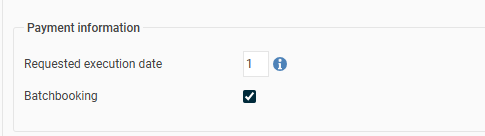
Requested execution date
Here you can specify how many banking days before the payment date the bank desires as an execution date. 0 means the execution date is set to the payment date.
Batchbooking
If this is ticked, the total wage cost will be withdrawn from the payer’s account as one transaction; otherwise there will be one transaction per payroll payment (employee).
Initiating Party
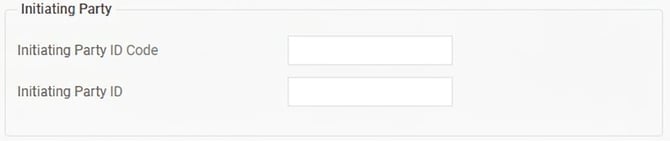
Initiating Party Id Code
Here you enter the code requested by the bank, usually BANK or CUST.
Initiating Party Id
Here you enter the ID to be used for identification in Initiating Party.
Debtor
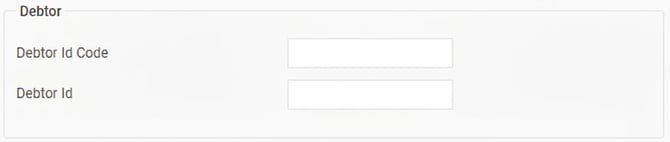
Debtor Id Code
Here you enter the code requested by the bank, usually BANK or CUST.
Debtor Id
Here you enter the ID to be used for identification in Debtor.
Debtor Account
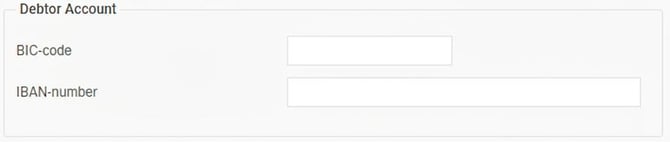
Here you enter the IBAN-number and BIC-code for the bank account from which the payment will be made.
Creditor
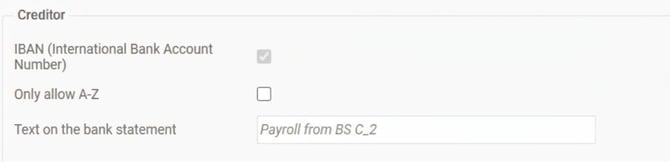
Here you enter information about how the payee should be handled.
IBAN (International Bank Account Format)
As there is no general support for Swedish bank account numbers in the ISO format, you can only choose payment via IBAN/BIC to the employees.
Only allow A-Z
If this setting is activated, texts (names and addresses etc. for companies and employees) will only contain the characters a-z (capital and lower case), numbers 1-9, spaces and underscores. Any invalid characters will be replaced by valid characters. For example, å and ä are replaced by a, and ö by o.
Text on the bank statement
Here you can choose which text will appear on the employee’s bank statement. Please note that this will not work fully until Bankgirocentralen’s new payment infrastructure is in place and the bank supports this feature. Contact your bank for more information.
International payments
With ISO 20022, there is a technical possibility to make wage payments to bank accounts worldwide using IBAN (International Bank Account Number). However, it is not quite that easy. To make this possible, the bank your company uses must support international payments.
Most Swedish banks have initially chosen to only allow wage payments to Swedish bank accounts. In most cases, this means you can enter the Swedish bank account number or the IBAN-number for the Swedish bank account.
If you wish to make wage payments to bank accounts in other countries, you need to contact your bank and ask which countries they currently support. The banks are constantly working on enabling support for more countries, and most Swedish banks start with the Nordic countries, then the EU countries and then move on to the rest of the world.
IBAN in the employee register
If your bank supports international payments and you use the ISO 20022 file format to your bank, you can enter the IBAN-number for employees under the Payroll tab in the employee register. Under Payment of salary to you select IBAN-number and then enter the IBAN-number and BIC-code the employee wishes to receive their salary to. When entered, the system checks that the IBAN-number is in the correct format.
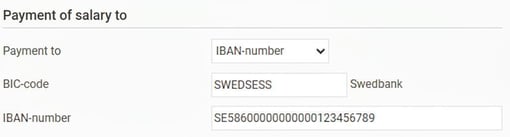
The information about IBAN and BIC can also be imported via the import template for users/employees.
When making payments to foreign IBAN accounts, you must also include the address (as registered for the employee) and country code in the file due to anti-money laundering regulations (country as registered for the employee). For this to work, you need to enter a country that matches the countries register (under Administration – System register – Countries).


Glossary
- P27
P27 Nordic Payments Platform is a Nordic initiative aiming to create a joint, modern and future-proof infrastructure for payments in the Nordic region. It is a collaborative banking project intended to promote trade within and between the Nordic countries, partly by enabling real-time cross-border payments. The plan was for P27 to replace Bankgirocentralen in Sweden, but the project was cancelled. - ISO 20022
This is a technical standard for exchanging financial information, such as payment transactions between banks. The standard is developed by ISO (International Standardization Organization) and is a global standard based on XML files. - Pain.001
This is the part of the ISO 20022 standard used for payments (Payments Initiation). This is the part used for wage payments. - XML
XML stands for Extensible Markup Language and is a ruleset for structuring data in files. - IBAN
IBAN stands for International Bank Account Number and is an internationally accepted standard for identifying bank accounts in transactions between different countries. A Swedish bank account consisting of clearing number and account number can be converted to an IBAN-number, which can then be used for international payments. - BIC
BIC (Business Identifier Code), previously known as SWIFT, is just like IBAN an international standard used in international transactions. BIC is used to reliably identify banks in cross-border transfers. - BBAN
BBAN stands for Basic Bank Account Number and refers to a country-specific bank account number. BBAN is part of the IBAN, specifically the last part after the first 4 characters in IBAN (which include country code and check digits). BBAN should not be confused with a Swedish formatted bank account number with clearing and account numbers. However, a Swedish bank account number can be converted to a BBAN in the way determined by each bank (in Sweden).
Related articles:

How do I change the bank file format?
Please note: This article is AI-translated. This means that linguistic errors or misunderstandings may occur.