
Basic settings

Individual information

Pay code settings

Pay rise and salary change (ITP2)

Which employees are included in the Re-notification?

Which employees are included in the Un-subscription?

Reported salary for ITP1

Annual salary for ITP2

Salary change for ITP2

Merging per National ID number

What is not supported in the file from Flex HRM Payroll?
Basic settings
The first step is to activate the settings for reporting to Collectum in the current company under Administration > Settings > Payroll > Pension and insurance.
In the list to the left, you can see the company's active reporting to the different pension intermediaries. If Collectum is not in the list, click the button New and complete the details in the form to activate reporting to Collectum.
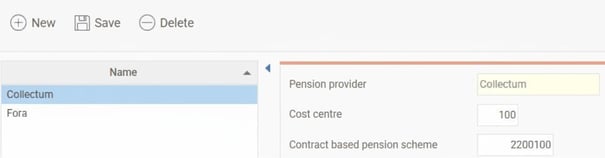
You can specify the following details here:
- Cost centre
To split the invoice from Collectum between different departments, employees can be reported on different cost centres. Here, you specify the company's main cost centre to be used as the standard for employees. Employees without another specified cost centre will be assigned this cost centre when reporting to Collectum. - Contract based pension scheme
Here, you enter the company's code for the contract based pension scheme at Collectum. The code you enter here will be used for all employees who do not have a deviating value in the Employee register.
Individual information
In the Employee register, under the tab Pension & insurance, you specify the terms that apply for the employee when reporting to Collectum.
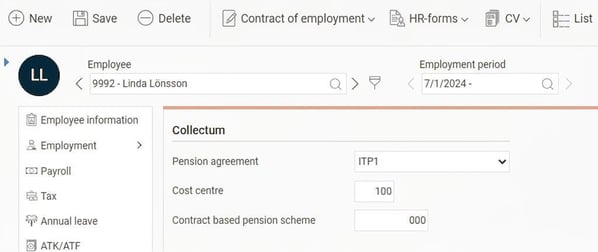
You enter the following details here:
- Pension agreement
Select whether the employee is covered by ITP1 or ITP2. The agreements are partially age-based, but an employee born before 1979 can belong to ITP1 if the company has agreed, so you must select which agreement applies here. Employees who do not belong to either ITP1 or ITP2 will not be included in the reporting to Collectum. - Cost centre
Here, you enter the cost centre on which the employee should be reported. If you do not specify a cost centre, the company's standard will appear here in grey italics and will be reported. - Contract based pension scheme
Here, you enter the contract based pension scheme that applies to the employee. If you do not specify a contract based pension scheme, the company's standard will appear here in grey italics and will be reported.
- Incapacity for work
If the employee belongs to ITP2, you must report the grade of incapacity for work in case of sick leave after day 90. Sick notification is made via Collectum's web office. The information about incapacity for work entered in Flex is used when reporting a re-notification with incapacity for work or when the salary changes during a period of sick leave.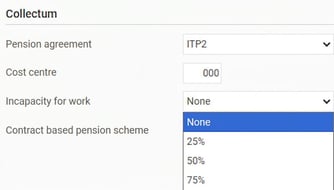
Pay code settings
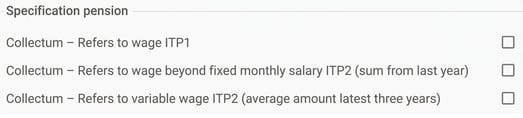
For reporting pensionable salary for ITP1 and for calculating the annual salary for ITP2, the pensionable salary must be taken from certain pay codes. Therefore, you must specify which pay codes are to be pension-salary based by using these three checkboxes under the tab Payroll pay code register (Administration > Settings > Payroll > Pay codes).
- Collectum - Refers to salary ITP1 – the setting is specified on pay codes that should be included in the summary of the specification for Reported salary for ITP1.
- Collectum - Refers to salary in addition to fixed monthly salary ITP2 (sum from previous year) – the setting is specified on pay codes that should be included in the calculation of annual salary (excluding fixed monthly salary) for ITP2, based on payments during the previous calendar year (1 Jan – 31 Dec).
- Collectum - Refers to variable wage ITP2 (average amount for the last three years) – the setting is specified on pay codes that should be included in the calculation of annual salary ITP2 (excluding fixed monthly salary) for the last three calendar years (cash principle, 1 Jan – 31 Dec).
For more information about how the system calculates payroll specification, see the sections on Reported salary for ITP1 and Annual salary for ITP2 further down in this article.
Pay rise and salary change (ITP2)
To be able to calculate a correct annual salary for ITP2, we need to know whether the employee has any fixed pay rises as well as salary change. To do this we use Additional fields which are defined under Administration > Settings > Personnel > Employee register – Additional fields.
For all fields to be counted as a pay rise or salary change you tick the corresponding box. If you have several fields for pay rise, tick the box for each field.
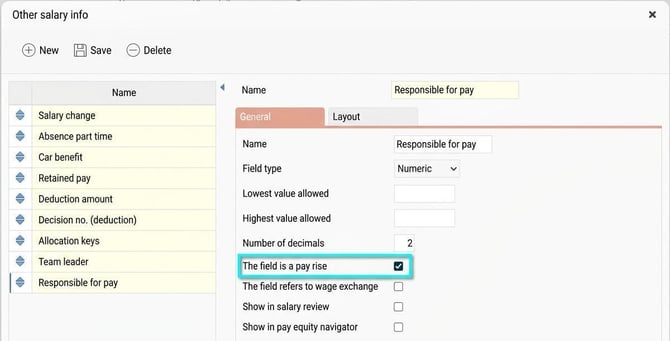
For more information on how these fields are used, see the section Annual salary for ITP2.
Detailed information on how the specification is created
Below you will find detailed information on how the specification is created in the system.
Which employees are included in the Re-notification
An employee is re-notified according to the following conditions.
If the employee belongs to ITP1
- The employee starts during the period and is over 18 years old.
- The employee is turning 18 during the period.
If the employee belongs to ITP2
- The employee starts during the period and has actual working hours of at least 8 h/week.
Which employees are included in the Un-subscription
An employee is un-subscribed according to the following conditions.
If the employee belongs to ITP1 or ITP2
- When the employee leaves during the period (end of employment cause 1).
- If un-subscription was reported the previous period, and a new employment period begins this period, the un-subscription will be cancelled (end of employment cause 9). In such cases, no re-notification should be made.
Reported salary for ITP1
The reported monthly salary for ITP1 comprises the amount on payroll transactions with pay codes marked as "Refers to salary ITP1" and which are included in payroll runs with payment date during the reporting period.
Annual salary for ITP2
The annual salary for employees belonging to ITP2 is calculated according to the following formula:
(MS + PR – SC) x 12.2 + A + B + C
- MS = The actual monthly salary according to the employee register
- PR = Pay rise is counted as values from own numeric fields that are marked as pay rise.
- SC = Salary change is counted as the value from own numeric fields that are marked as salary change. Read more about salary change in the section on Salary change for ITP2 below.
- A = Summarized amount from payroll transactions with the pay code setting "Collectum - Refers to salary in addition to fixed monthly salary ITP2" summarised for the previous calendar year (1 Jan – 31 Dec).
- B = Average amount from payroll transactions with the pay code setting "Collectum - Refers to variable wage ITP2" summarised on payment dates for the three previous calendar years (1 Jan – 31 Dec) (cash principle). Years without an employment period are not included in the average calculation. Employment periods marked as "Final pay paid out" will not be included in the calculation.
Average calculation: (Amount year -1 + Amount year -2 + Amount year -3) / Number of years with employment period.
Even if a year does not have an amount, it is still included in the calculation; however, the average changes if an employee has only been employed for two out of the three years.
C (Holiday increment on variable wage/bonus) = (0.5 * Annual leave entitlement / 100) x B
Salary change for ITP2
Salary change means that the employer and the employee agree that the employee forgoes part of their wage in exchange for some other benefit, such as an extra contribution to their pension.
For employees covered by ITP2, the employer must report the annual salary after salary change, i.e. reduced according to the above section on annual salary calculation. The reduced annual salary should then be stated in the Annual salary field, which is the most common procedure.
However, the employer can choose to compensate the employee for the loss of premium that salary change entails by reporting double salaries to Collectum, i.e. both the higher salary (annual salary before salary change) and the lower salary (annual salary after salary change). The higher salary should then be reported in the Annual salary field, and the lower in the ÅrslönEfterLöneavstående field. We do not currently support this option in Flex HRM Payroll, as it is relatively rare.
Merging per National ID number
If you have several employee numbers for the same individual to be reported to Collectum, these must be merged for reporting. The system does this automatically from version 2023.7 for both ITP1 and ITP2. Both pensionable salary and events, such as re-notification and un-subscription, are managed during merging.
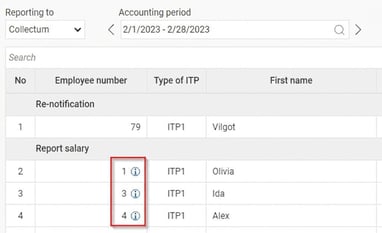
If a merger has taken place in the reporting, a small info symbol will be shown in the pension specification. When you hover the mouse pointer over it, you get information about which employee numbers have been merged.
What is not supported in the file from Flex HRM Payroll?
There are some details that can be reported in the file to Collectum but which cannot yet be reported from Flex HRM Payroll.
Salary change for ITP2 when you want to report double annual salaries
See information in the section Salary change for ITP2.
Un-subscription during leave of absence and parental leave
If an employee is on leave of absence or parental leave for a longer period, in some cases they must be unsubscribed from Collectum. As there is already a certain level of manual processing for these via Collectum's web office, we have chosen not to build support for this in the file. This applies to both ITP1 and ITP2.
Part-time leave of absence for ITP2
For employees with ITP2 who are on part-time leave of absence, in some cases un-subscription must be done and in other cases the annual salary must be reduced. This processing is not done automatically in the system and needs to be managed manually via Collectum's web office.
Moving of employees within concern
If an employee is going to be moved to another company within the concern or to another cost centre, this can be reported via the file to Collectum. We have not yet built support for this and refer for the time being to Collectum's web office.
Re-notification upon change of personnel category
If an employee changes personnel category to official, no re-notification to Collectum is triggered; the employee will simply be included in the file with details under Salary notification. Re-notification must be submitted manually in Collectum's web office.
Related articles:

How do you report to Collectum in Flex HRM Payroll?
Please note: This article is AI-translated. This means that linguistic errors or misunderstandings may occur.