
How do I find differences in tax and employer's contributions?
If you receive a warning in the PAYE return that the calculated employer's contribution or tax does not match between the individual data and the main data, you can follow these steps to investigate the cause of the error.
Example:
We receive a warning for an employee, indicated in the system by a red ball on the left.

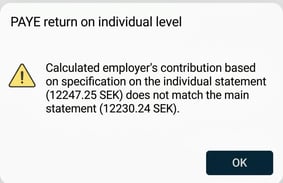
By clicking on the red ball we get the following information stating that it is the employer's contribution that does not match.
On the right, we can see which amounts are reported per field.
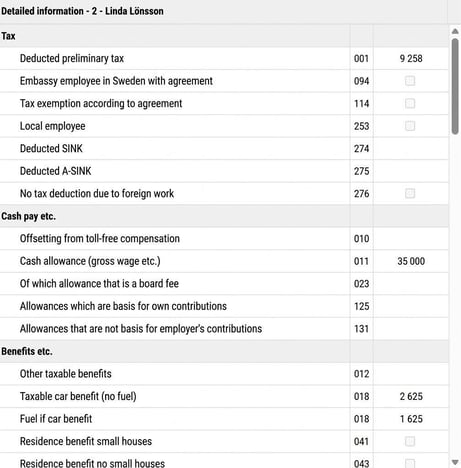
In this case, the fields that are the basis for employer's contributions are fields 011, 013, and 018. However, the amount in box 018 is the increased value for the fuel benefit, which means employer's contribution should not be paid on the full amount (but the amount divided by 1.2). Based on this information, we can calculate the employer's contributions as follows:
(35,000 + 2,625 + (1,625/1.2)) × 31.42% = 12,247.25
This amount matches what the message states is reported in the individual data. But in the main data, an employer's contribution of 12,332 SEK is calculated, which can be seen in the main list. This is the calculation the system performs and notifies if a difference exists.
To find the cause of the error, we need to look at the employee's payroll transactions and check how they are reported in the PAYE return on an individual level.
Do the following:
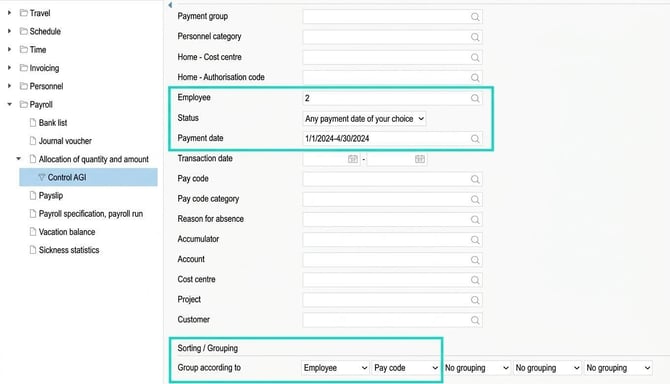
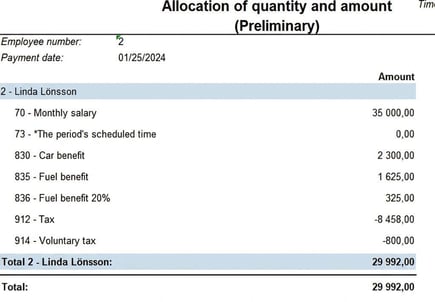
- Export the report "Allocation of number and amount" for the employee and current accounting period to Excel with the following selection.
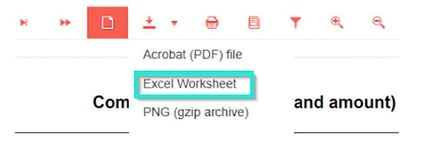
- Export the report to Excel.
- We then get the following in Excel:
- Manually add these three columns and fill in which rows should be the basis for employer's contributions, which Accumulator the pay code is governed by according to the pay code register, and which field in AGI the Accumulator is linked to according to the Accumulator register.
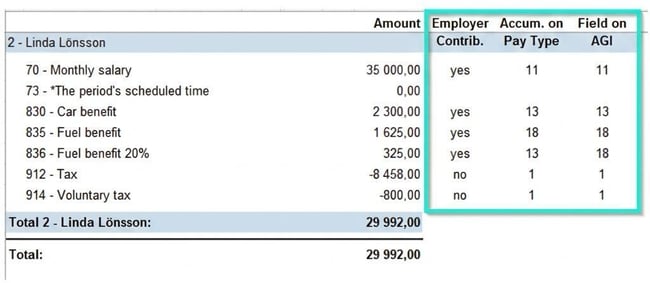
After filling it in, we see that pay code 836, Fuel benefit, 20%, is linked to Accumulator 13 (instead of 18) and therefore to the wrong field in AGI as well. It should be linked to Acc No. 18 and field 18 on AGI. - To correct this, we adjust pay code 836 so that it links to Accumulator 18 – Fuel benefit. After that, we recalculate the AGI basis by completing the specification for all employees or the affected employee. When this is done, the value in box 18 changes to 1,950 SEK, which is the correct value, and the red ball now lights up green.

Related articles:

How do I work with PAYE return on individual level in Flex HRM Payroll?

How do I make a correction of an error in earlier PAYE returns (AGI) in
HRM Payroll?

How do I work with PAYE return on individual level in Flex HRM Payroll?
Please note: This article is AI-translated. This means that linguistic errors or misunderstandings may occur.