
Correction of errors in earlier PAYE returns
If you have discovered errors in the submitted report to the Swedish Tax Agency, you must make a correction to the incorrect information. Depending on the type of error, you may need to correct an already submitted PAYE return instead of adjusting the error in a coming period. It is not permitted to report negative amounts in any field, which means some types of corrections cannot be made in a later period.
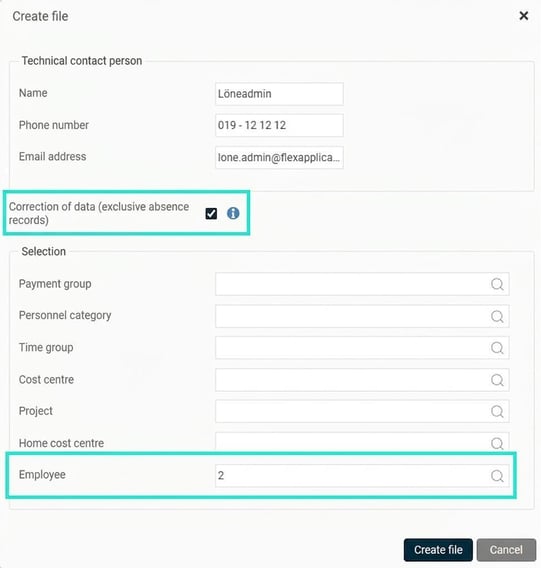
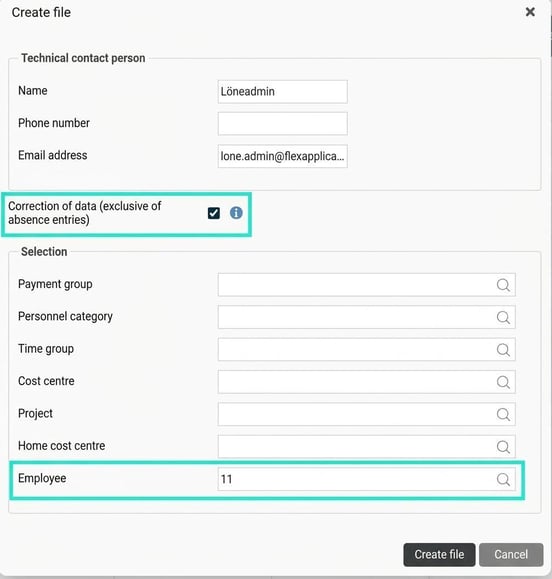
If you want to create a file to make a correction, you can choose not to include all employees in the file. This can be used if, for example, you only need to submit a correction for one employee. You then tick Correction of data.
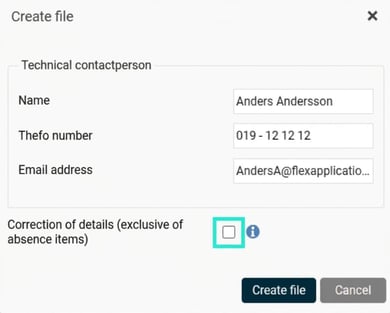
This means that extra fields for selecting employees to include in the file will be shown.
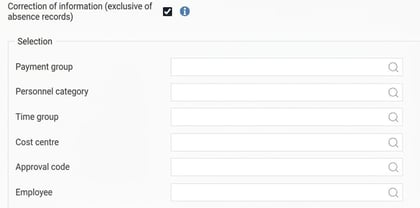
Note that it is always the latest submitted file for an accounting period that is used by the Swedish Tax Agency. You can therefore submit a complete file again, without ticking the correction box, which will then be considered a correction by the Tax Agency.
Below are some examples of different situations that may arise and how you resolve them.
Extra payment in a reported period
If you have completed the ordinary payroll payment, submitted the PAYE return and then discover that there is something else to be paid out in the same month via an extra payment, do as follows:
- Remove the checkmark on the PAYE return data for the current accounting period.
- Create an Extra payroll run to make the payments that need to be included.
- Once you have reconciled the Extra payroll run, check the PAYE return data again for the current reporting month. When the check is complete, mark the data as checked.
- Generate a file with the correction and submit it to the Swedish Tax Agency. If you have only corrected a few employees, you can choose to select these when creating the correction file.
Debt offset against wage in a later payment
If it is discovered that an employee has received too much allowance one month, you can choose to correct this against the wage in a later month as follows:
Example 1 – Deduction for VAB in a later month
In connection with the payroll payment in May it is revealed that an employee was absent for the care of a sick child for two days in March, which was missed from April's payroll payment. Resolve this by adding this VAB deduction to the payment in May as usual. The month in which the absence occurred does not matter, as the cash principle applies.
Example 2 – Debt to next wage in connection with parental leave
An employee goes on parental leave in the middle of February and wants the deduction made in the current month. This information was received too late by the payroll office, so no deduction for absence was made in February.
Proceed as follows:
- In the payment for March, enter the deduction for half of February and all of March as shown in the image, which results in a negative gross wage. A gross debt to the next wage then arises and is handled via a pay code for debt to next wage.
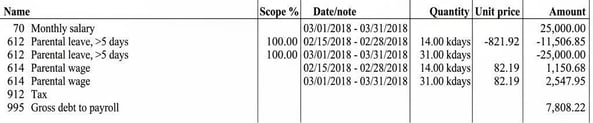
- The PAYE return on individual level for March will then be 0 SEK in gross wage and 0 SEK in tax for the employee.
- In the following months, you attempt to settle the gross debt by deducting as much of the debt as funds allow. As long as the parental leave continues, it is from the parental wage that the debt can be deducted, and if there is any debt left when the employee returns from parental leave, the remaining debt is deducted from the monthly salary.
Debt that cannot be offset in a later payment (repayment)
If the employer is unable to settle a wage debt by making a deduction from a later month's payroll payment, they can demand repayment of the incorrectly paid amount from the employee. The employer must then demand repayment of the incorrect gross amount, i.e. both the net amount received by the employee and the tax amount paid to the Swedish Tax Agency. The reason is that the employer has no right to reclaim incorrectly paid tax in the PAYE return on individual level system.
When requesting repayment, the employer must also correct the reported data with the Swedish Tax Agency and request a review of the decision on employer's contributions. If the employee has already been taxed for the incorrect payment, i.e. if the correction occurs a later year, the employee must themselves request a review of their income tax return.
Example 3 – An employee has received a salary but has left and the full salary must be repaid.
An employee receives their monthly salary paid out in September. However, it turns out that the employee has left without the payroll office being informed and the entire monthly salary must be repaid.
Proceed as follows:
- In the ordinary payroll run for September, the monthly salary is paid and reported as follows:
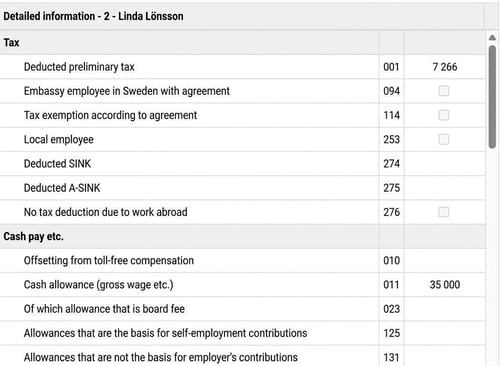
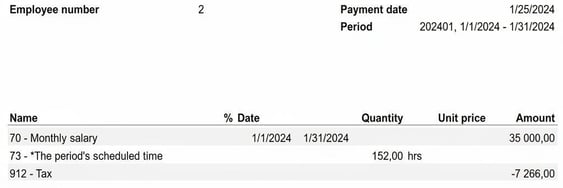

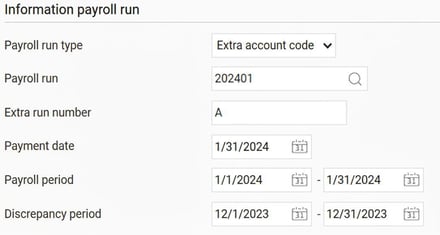
- Remove the checkmark from the PAYE period and create an Extra payroll run to correct the reporting for the employee. The Extra run must have a payment date for the same month as the incorrect payment.
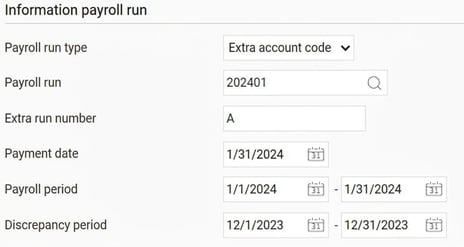
In the Extra run, enter the pay code that was paid incorrectly as a minus, in this case pay code 70 Monthly salary. As the tax cannot be corrected, do not enter any row for tax. The gross wage should then be a negative value and the tax 0.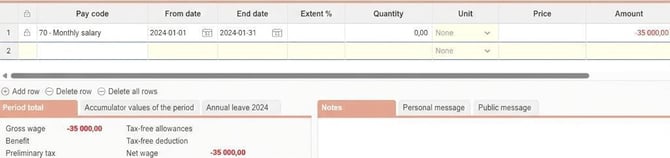
- Check that the gross wage and employer's contributions have been zeroed in the PAYE return data, and that the tax is unchanged from the previously reported tax.
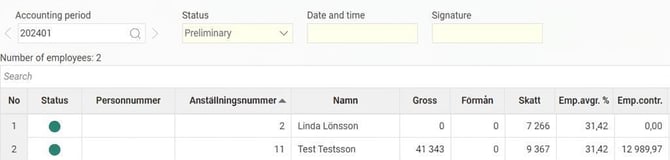
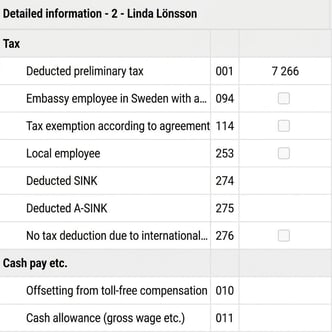
- When everything looks good, reconcile the Extra payroll run.
- After this, mark the PAYE return data as checked and create the correction file for the employee, which you report to the Swedish Tax Agency.
An employee has received a car benefit, which is found out three months later
It is important that allowances and benefits are reported in the correct month. If a car benefit has not been correctly reported, you need to make corrections for those months.
Proceed as follows:
- Start by unmarking the confirmation for PAYE for the months in which the car benefit should be included.
- Create an Extra payroll run for the first month, select the employees to only include those whose PAYE needs correcting, and then enter the car benefit value.
- Generate a new PAYE return on individual level and submit the correction.
- Continue with this for all the months concerned.
Related articles:

How do I process the PAYE return on individual level in Flex HRM Payroll?

How do I find the reason for discrepancies in employer's contributions (PAYE) in Flex HRM Payroll?

How do I set up settings for workplace, place of service, for the PAYE return (AGI) in HRM Payroll?

Why do I get a warning in the PAYE data on individual level (PAYE) that there is a negative amount in field 499?
Please note: This article is AI-translated. This means that linguistic errors or misunderstandings may occur.