
How to create a new specification
The first step in reporting is to create a specification for the month the report concerns.
-
Go to Administration > Actions processed > Statistics reporting > Bygglösen
-
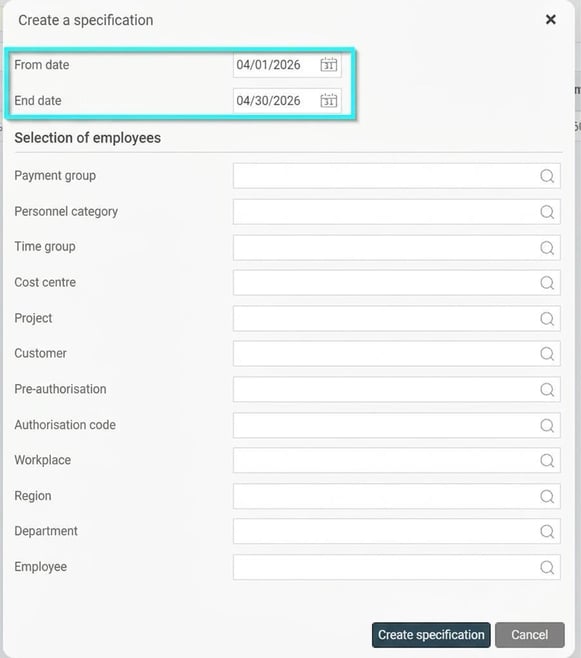
Click the New button in the button bar.

-
Select the current accounting period, for example, if you are to report paid wage and hours for March and they have been calculated in April payroll, select the period 1–30 April.
Note: If you are using a broken payroll period, create the specification for the corresponding period, e.g., 16/4–15/5.
-
If needed, you can also make additional selections to limit the specification.
In the completed specification, an employee may be reported on several rows. This could happen, for example, if they have worked in different counties or with different municipality codes.

You can also export the specification to Excel by clicking the Excel button in the button bar.
Once the specification has been reviewed, mark it as checked by clicking the Mark as checked button.

The specification will then have the status Inspected. The system also saves the date, time and user signature of the person who performed the check.

If you find an error in a checked specification, you can remove the checkmark, which returns the status to preliminary.
File for reporting
When the specification has been compiled, a report file is automatically generated. This file simplifies reporting and can be accessed via the Show of files button in the button bar.
The list of files contains one file per accounting period, with the latest at the top. The file remains available until you choose to delete the specification in the main view. Download the file by clicking the icon and submit it.
Which employees are included in the report?
For an employee to be included in the specification, the following two criteria must be met:
-
The employee belongs to a personnel category that is linked to an agreement area.
-
The employee has registered hours worked in the payroll run. This means there is a pay code marked for worked time.
How are values fetched for the report?
| Column | Source of value |
| Workstation number |
For performance pay: the project's workstation number via account code on the transaction. Rows are grouped by this value when relevant. |
| Agreement area | Agreement area in the personnel category for the latest employment period within the date interval. |
| Allocation keys | Value from the employment's numerical field marked as allocation key. |
| Salary type | Hourly pay or performance pay based on the project setting. |
| Hours worked | Sum of number of hours on transactions where the pay code is marked with Construction Pay - Worked Hours. |
| Base wage per hour | For performance pay: Contracted hourly wage according to the employee register, taking the applicable allocation key into account. |
| Payment level per hour | For performance pay: From the project setting, taking allocation key into account. |
| Paid surplus bonus | Sum of amounts where the pay code is marked with Construction Pay - Applies to surplus bonus, but only if there are hours worked at the same workplace in the specification; otherwise blank. |
| Payroll | Sum of amounts from transactions where the pay code is marked with Construction Pay - Applies to paid wage. |
| Contracted monthly salary | Latest monthly salary within date interval from the employee register. Applies only to monthly paid employees. |
| Overtime hours | Sum of hours from transactions where the pay code is marked with Construction Pay - Overtime Hours. |
| Overtime Allowance | Sum of amounts from transactions where the pay code is marked with Construction Pay - Overtime Allowance. |
| Shift Premium | Sum of amounts from transactions where the pay code is marked with Construction Pay - Shift Premium. |
| The construction site's county and municipality |
From account code for county and municipality on the transaction's account code. |
| ProfessionCode |
The field Profession code (NYK14) in the employee register on the latest employment period within the date interval. |
| Professional category |
The Professional category field in the employee register on the latest employment period within the date interval. |
| Role increment |
Sum of amounts from transactions where the pay code is marked with Construction Pay - Role increment. |
| Activity increment |
Sum of amounts from transactions where the pay code is marked with Construction Pay - Activity increment. |
| Competence increment |
Sum of amounts from transactions where the pay code is marked with Construction Pay - Competence increment. |
| Responsibility increment |
Sum of amounts from transactions where the pay code is marked with Construction Pay - Responsibility increment. |
Please note: This article is AI-translated. This means that linguistic errors or misunderstandings may occur.