
Types of employment
Click on Settings > Personnel and select Types of employment from the menu.
You will then see the following view:
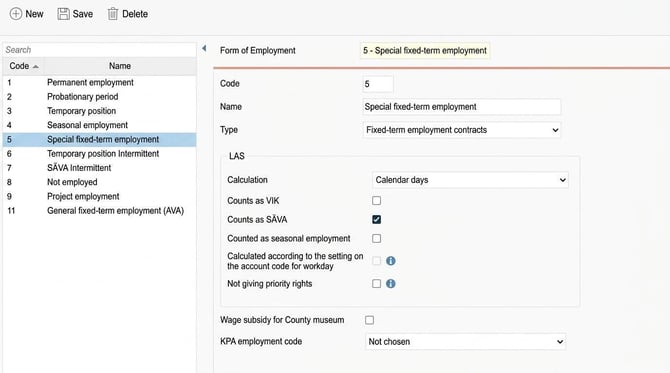
The list on the left displays previously created types of employment. On the right, information about each type of employment is specified or shown.
- Code - Here the code (abbreviation) for the current form of employment is shown or specified.
- Name - H ere the designation for the form of employment is shown or specified.
- Type - To ensure the system processes the different types of employment correctly, specify here the current type of employment. The following options are available:Permanent employment, Probationary period, Fixed-term employment contracts, Temporary position and Temporary employment.
- Settings for LAS - Here you make settings that control the handling of LAS (Employment Protection Act) for the selected type of employment. For more information, see LAS - Settings and calculation details.
- Wage subsidy for County museum - T his setting is linked to wage statistics for Sobona (formerly KFS). For county museums, Sobona provides a special handling for wage type for employees with wage subsidies.For these, you should specify wage type 4 and 5 instead of 1 and 3 (monthly pay/hourly pay). To process this, there is this check box where you mark that it applies to wage subsidy for County museum.
- KPA employment code - T o be able to report the correct employment code to KPA, this needs to be specified in HRM. Mark here the employment code to be used for each type of employment.
Please note: This article is AI-translated. This means that linguistic errors or misunderstandings may occur.