
Allowances that can be clocked
In HRM Timeclock, there is the option to clock allowances, that is, specify allowance codes or time codes which appear under the tab Allowances in the time report.
Allowance codes are created under Settings > Time and Plan > Allowances.
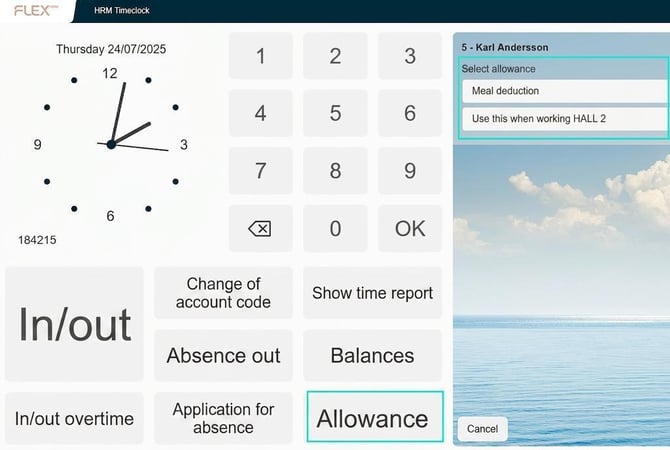
Set up a button for allowances on your time clock. This is done under Administration > System register > Time clocks.
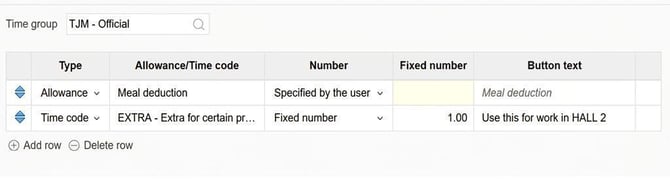
You also need to select which time codes/allowances you want users to be able to clock, which is done under Settings > Time and Plan > Allowances that can be clocked. Click on Add row to add an allowance or time code that should be available for users to select in HRM Timeclock. You can also specify which button text will be used and whether users are allowed to choose the number themselves or if it should always be set to a fixed value.
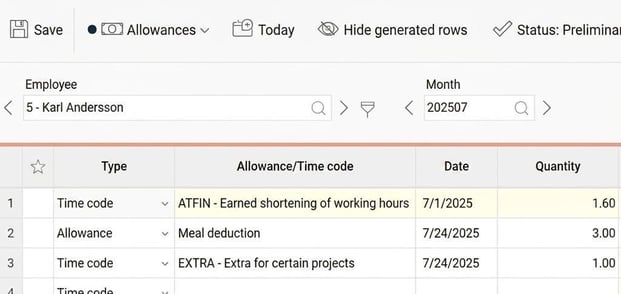
The clocked allowances appear under the tab Allowances in the time report.
Tip!
You can set up a button in the time clock for a specific allowance code, instead of letting users select a code themselves. This is done using the function Direct selection in the time clock settings. Remember to name the button clearly to indicate its purpose.
Related articles
Allowances - How do you manage non-hourly-based allowances in HRM Time?
How do I change the buttons in the time clock?
Please note: This article is AI-translated. This means that linguistic errors or misunderstandings may occur.