
In Flex HRM, we use background jobs to process many functions. We do this to maintain the system’s performance even when you carry out heavy processes.
Examples of functions managed as background jobs include:
-
Transfer of travel expense claims or time reports to payroll.
-
Release to invoicing.
-
Recalculation of travel expense claims or time reports.
View status via notes
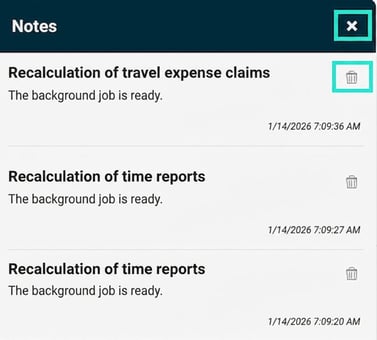
You receive information about background jobs via a note in Flex HRM. These are displayed in a popup window.
-
If you want to delete a separate note, click on the bin.
-
If you want to delete all notes at once, click on the x.
Find your notes
When the page is reloaded or if you change view in Flex HRM, the popup window disappears. You will then see a clock at the top right which informs you that there are notes. If you want to see your notes again, click on the clock.

Related
What are background jobs and where can I find them?
Please note: This article is AI-translated. This means that linguistic errors or misunderstandings may occur.