
This product is under development. The content of the article will be updated as new changes are made.
Getting started with job profiles
You manage and organise all job profiles in the view Pay Equity Compass > Job architecture > Job profiles.
Create a new job profile
When it is time to create a new job profile, follow these steps:
- Click on Create a new job profile.
- Start by filling in the name and description of the work in the job profile
- Add all the relevant positions that fit the job profile. Tick the box to search for positions from your position register.
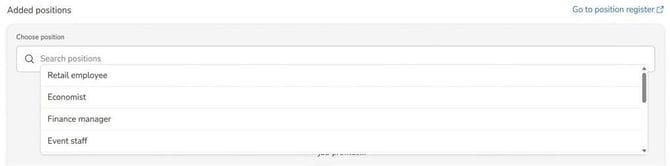
- Choose career band. Career bands show, among other things, whether the job profile is managerial in nature or not.
- Set your own Classification. This is optional and can be used if you already have an existing classification of the works.
- Specify Salary range for the post, which applies to new recruitment.
- Enter information about Market salary.
- Click on Save profile in the top right corner.
You can now continue and create all the job profiles your company requires.
How do I edit an existing job profile?
If you need to update the information in a profile you have already created, follow these steps:
-
Go to Pay Equity Compass > Job Architecture, select Job profiles.
-
Search for the job profile you want to edit.
-
Select the profile in the list.
-
Click on Edit.

Make your changes and then click Save profile.
Search for a position
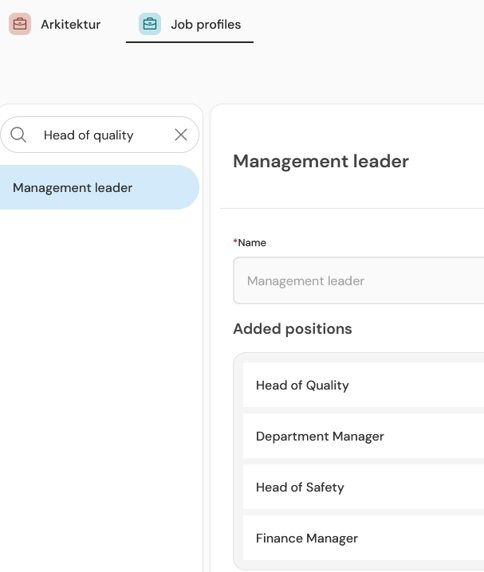
You can easily search for a specific position in the search box directly in the view Job profiles. This will show all job profiles that match your search.
Example: If you search for the position "Head of Quality", the job profile Management leader, will appear, as this job profile contains the position you searched for.
How do I delete a job profile?
If a job profile is no longer needed, you can delete it completely:
-
Search for the job profile in the list.
-
Click on Edit.

-
Select the button Delete profile.
Note! If you delete a job profile and you have an ongoing work evaluation, it will be affected.
Related articles
What does career band mean in HRM Pay Equity Compass?
Getting started with the Pay Equity Compass - Checklist
Please note: This article is AI-translated. This means that linguistic errors or misunderstandings may occur.