
With the help of the reminder All time reports reviewed you can receive a reminder when all time reports that need to be reviewed have been checked.
The reminder is often used so that the payroll administrator knows it is fine to start transferring time reports to payroll, but it can be set for all audit levels.
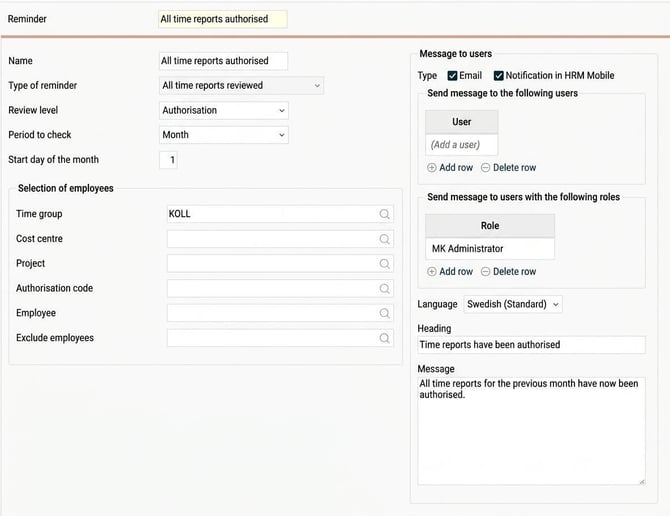
The image above shows the setting for the reminder. You select the audit level and whether the check should be done by week or month. Choosing month also gives you the possibility to set a start date. Set 1 if you want to check time reports by calendar month.
Like other reminders, you can make selections by time group, home account code, and employees if only certain people in the company should be included. There is also an option to exclude employees, which can be useful if, for example, you have test users or external personnel who are not reviewed.
|
When the last time report covered by the reminder has been reviewed, a reminder will be sent to the recipients you specified. Recipients can be individual users or users with a specific role. If you choose to send it to a role, it is enough for the user to have that role for the company; no check is made as to whether they have that role for specific employees. The reminder can be sent by email and/or as a notification in HRM Mobile. It cannot be shown in the reminders panel on the HRM front page.
|

|
What happens if an employee is included in the selection for only part of the month?
Say that the reminder is set to send for all employees with home cost centre X and that employee 2 belongs to home cost centre X From 2 July.
When the reminder is sent for the period 1-31 July, the time report for employee 2 is included, even though that person is only in the selection for part of the period.
What happens if a time report is unreviewed after the reminder has been sent? The reminder cannot be withdrawn.
When the time report has been reviewed again, a new reminder will be sent, as there will once again be an audit of the period's last time report.
Read more about reminders in HRM:
How do reminders work?
Please note: This article is AI-translated. This means that linguistic errors or misunderstandings may occur.