
In HRM Time, there is a function for sending out reminders in the event of consecutive absence. You can use this reminder, for example, to inform an employee that it is time to submit a doctor's certificate, or to remind a manager or administrator to report the absence to Försäkringskassan.
In the reminder, you set the reason for absence, so it can be used for other absence than just sickness.
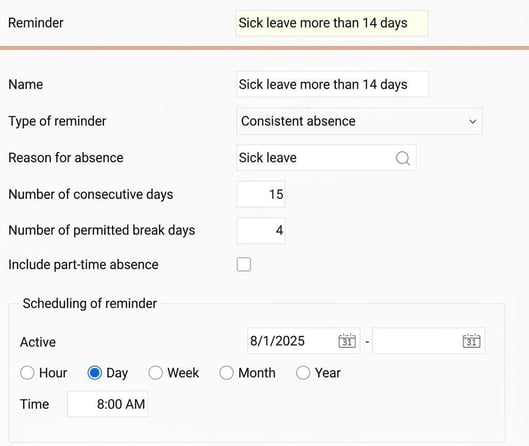
How the reminder works
Reminders are sent out at a set time, often daily in the morning. Flex HRM counts the number of days with consecutive sick leave to trigger the reminder.
-
A reminder to the employee is usually sent after more than seven days of consecutive sick leave, so that they know it is time to submit a doctor's certificate.
-
A reminder to a manager or administrator is usually sent after more than fourteen days of consecutive sick leave, so that they know it is time to report to Försäkringskassan.
If, for example, you set a reminder for eight days of consecutive sick leave, the reminder will be sent on the morning of day nine. That is when the system sees that eight days of consecutive absence have been reached.
Calendar days or work days?
The reminder counts calendar days, not work days. For Flex HRM to consider the period as consecutive, there must be sick leave on both the first and the last day.
Flex HRM checks entries in the absence management to see which dates absence exists. Absence registered directly in the time report is not included.
What are break days?
Break days are for processing a relapse. According to the relapse rule, a period of illness is counted as consecutive if you become ill within five days of having recovered. In Flex HRM, you can allow four break days to handle this.
You do not need to specify break days to manage days off. The reminder does not check the employee's schedule. If there is an entry for the day in the absence management, it is counted as an absence day. If there is no entry in the absence management, it is a break day.
Is absence part time included in consecutive absence?
The reminder has the setting Include part-time absence. Use this to generate reminders also for absence part time.
Example: Reminders for consecutive absence
Below are a few examples illustrating how the reminder function for consecutive absence works. In these examples, we have set a reminder to be sent after fifteen consecutive days of sick leave, and allowed up to four break days.
Example 1: Different start dates for the absence
-
Employee 5 has been on sick leave from Monday 25th August. When the reminder is checked on the morning of 9th September, fifteen calendar days have passed with consecutive sick leave. The reminder is therefore sent for employee 5.
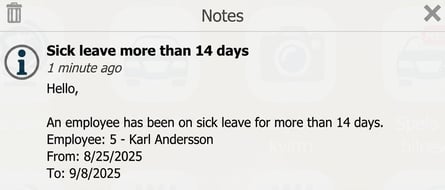
-
Employee 7 has been on sick leave from Tuesday 26th August. By the check on the morning of 9th September, fourteen calendar days have passed. Since the reminder is set to be sent after fifteen days, it is not sent for employee 7. Instead, it will be sent on the morning of 10th September.
Example 2: Breaks in the period of illness
Employee 3, who is scheduled Monday to Friday, has been on sick leave from 25th August to 3rd September, and then again from 8th September. Between the two periods, he has had four break days, 4th-7th September.
Since the reminder allows up to four break days, the two periods of illness are counted as one consecutive absence. But when the reminder is checked on 9th September (calendar day 16 after 25th August), only twelve days with actually registered sick leave have passed. The reminder is therefore not sent. It can be sent on 13th September, when a total of fifteen days with sick leave have passed.
Example 3 - Absence split in the absence management
Employees 5 and 9 are both on sick leave for all their work days from 5th to 20th May.


Employee 5 has a single absence entry for 5th-20th May, while employee 9 has entered absence with several entries: 5th-7th, 8th, 11th-13th, and 15th-20th May.
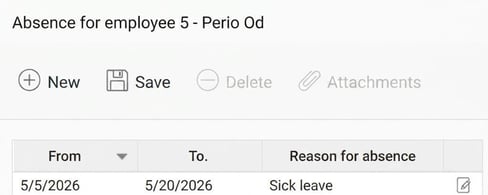
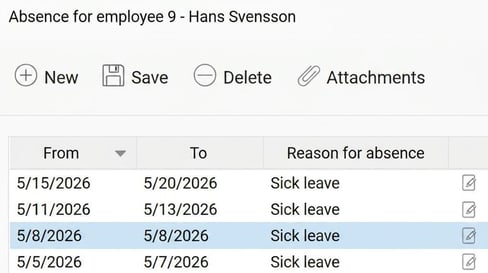
The time reports show the absence the same way, but splitting the absence into several entries with gaps means that for employee 9, 9th-10th and 14th May are break days.
The reminder counts calendar days, but does not include break days in the total number of days of consecutive sick leave.
The reminder sent on the morning of 20th May is sent for employee 5, as he has then had 15 consecutive calendar days of sick leave, but it is not sent for employee 9. Employee 9 has been ill for the same length of time, but the break days mean the reminder sees it as 12 consecutive days.
Related
How do Reminders work?
Please note: This article is AI-translated. This means that linguistic errors or misunderstandings may occur.