
Receive reminders about late arrival
You can receive a notification and/or an email if an employee is scheduled but has not clocked in or reported an absence. You set this up under Settings > General > Reminders. The reminder is called Late arrival.
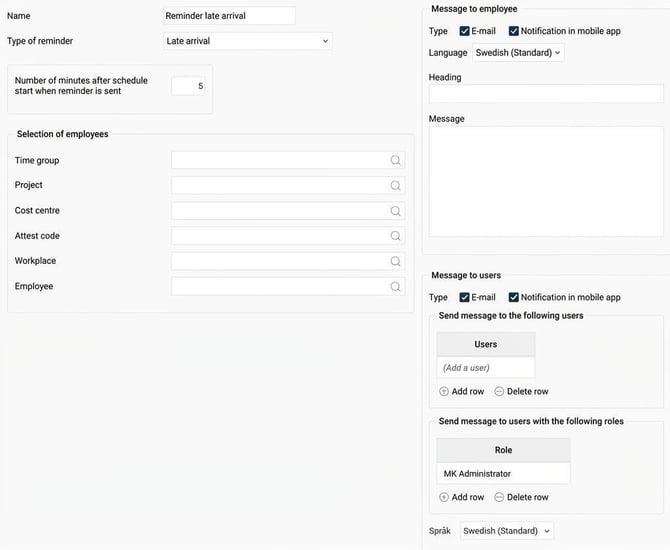
How to set up the reminder
You can choose for the reminder to apply to all employees, or to make a selection based on time group, home account code or specific employees.
Under Number of minutes after schedule start when reminder should be sent you specify how long after the schedule start the message should be sent out. Schedule start refers to the employee’s scheduled start time. If the employee has flexitime, it is the flexitime window’s 'until' time that applies.
You can also choose to receive a reminder before the schedule starts by putting a minus sign (-) in front of the number. For example, if you enter -5 the reminder will be sent five minutes before the schedule start/flexitime window's "until" time.
Decide who should receive the message
-
Message to employee: Choose whether the employee who is late should receive the message.
-
Message to users: Here you can choose whether a specific user or all users with a certain role for the employee, for example Manager, should receive the message.
The reminder can be sent as email and/or notification in HRM Mobile. If you use multiple languages in the reminder, the recipient's language settings determine which language the reminder is sent in.
Example
Employee 9 is scheduled to start at 12:30, with flexible time allowed between 12:20-12:40. The reminder is set up as in the image above, 5 minutes after the scheduled start.
Employee 9 does not clock in.
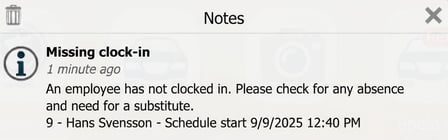
At 12:45, everyone with the MK Administrator role for employee 9 will receive a notification in HRM Mobile informing them about the missing clock-in.
Related
How do Reminders work?
Please note: This article is AI-translated. This means that linguistic errors or misunderstandings may occur.