
Users can delegate their authority via My profile > Delegate user authorisation.
You will see an overview of delegated authorities in the view Users/Authorities > Delegated authorities. Here, you can also edit and create delegations.
In the list on the left, you can see current delegations. If you want to view historical delegations, you can choose to do so. You will see the date of the delegation and which user delegated to which user. If you hover your mouse over the info symbol you will also see information about who last saved the delegation and when it was done.
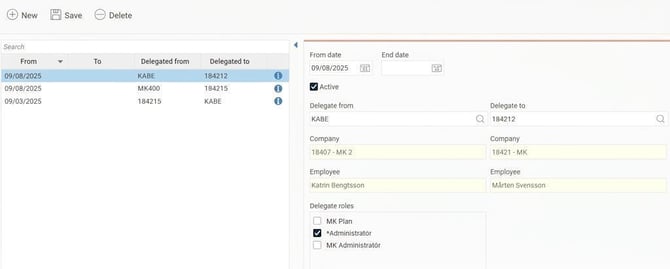
Create new delegations
To create a new delegation, you first select which user the authority should be delegated from and then which user you want to delegate to. Finally, select which roles you wish to delegate.
Which roles you can delegate is determined by the settings for allocation of roles. You can only delegate the roles for which you yourself are authorised to allocate. You can read more about authorisation to allocate roles in the article What is a role?
Edit delegations
You can only edit delegations that have been made by users you have access to. However, you can view delegations made by other users, if they are delegated to a user you have access to.
Please note that authorisation settings may prevent you from seeing all delegated authorities.
What happens to a delegation if the authority changes?
A delegated authority is valid until its end date. It remains valid as it was saved at the time of delegation. This means that if the person who delegated their authority has their settings changed afterwards, it does not affect the existing delegation.
Example
User A is an approver for all employees with home cost centre 1.
User A delegates their approver role to user B, which means that user B can also approve all employees with home cost centre 1.
User A changes business and is instead an approver for home cost centre 2.
The delegation to user B is saved as it was at the time of delegation. Therefore, user B is still an approver for home cost centre 1. They are not affected by the change made for user A.
We recommend that you always set an end date for delegated authority. If you want to give an authority on an ongoing basis, you should instead make the change in the user register.
Related
What is a role?
Can I temporarily delegate my approval authority to someone else when I am off?
Please note: This article is AI-translated. This means that linguistic errors or misunderstandings may occur.