
💻Here you will find a description of the workflow for assigning courses to employees
Course management
The Courses feature can be used to manage courses that employees are to attend or have completed. For each course, you then add course sessions that employees can be registered for. The different course sessions are administered in the course management view.
Courses can also be linked to the CV feature in HRM, so that you can export a list of which courses a person has completed.
Building up courses
The courses you would like to make available for selection are added in the course register under Administration > Register > Courses.
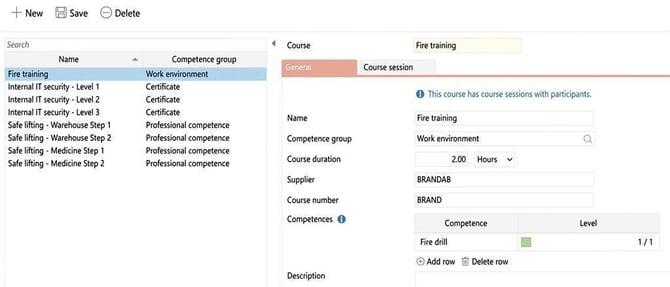
There, you specify the following details under General:
- Name
- Competence group
Specify which competence group the course relates to. The purpose is to group courses by subject area. For each competence group, you can choose whether they will be used for courses and/or competences, which means you can create competence groups, for example, that are only used for courses. These settings are found in the register for competence groups. - Course duration
Course duration is indicated to give an understanding of the extent of a course. - Supplier
Information on who is organising the course to, for example, simplify course bookings. - Course number
Eventual course number at the course supplier. - Competences
Add if a completed course should grant a competence
- Description
A short description of the course content.
Course session
For each course, you will also need to add the course sessions that should be selectable in the register per course.
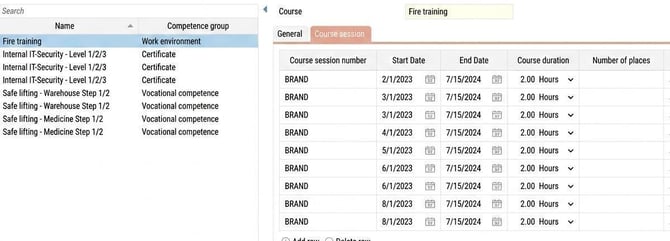
- Course session number
E ventual course session number at the course supplier.
- Date
Specify the dates for the various course sessions - Course duration
- Number of places
Is there a limited number of places? Specify how many participants can attend each session
- Supplier
- City
- Course price
Authorisations
To be able to use the course feature, you need to activate this on the relevant role(s).
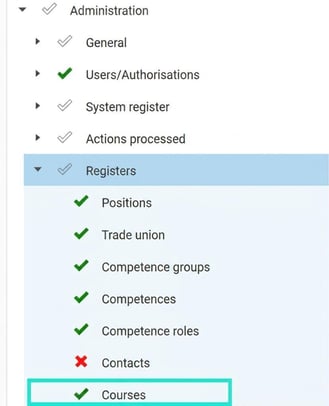
The following governs whether an Administrator has access to the register for courses and course sessions
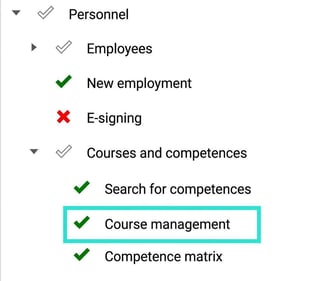
The following governs whether a role has authorisation for the course management view under Personnel
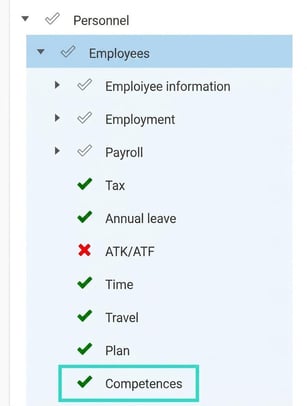
To be able to access and add competences/courses for an employee in the employee register the following authorisation is required
Please note: This article is AI-translated. This means that linguistic errors or misunderstandings may occur.