
Register time in the time report – period reporting
To period report means that you do not work with time, only the number of hours. As a period reporter you can choose whether you want to report your time in the week view or month view, it works the same way in both views.
Those who day report work in the day view and registration of time is done with time. Read more about registering time with day reporting.
Register attendance
Register attendance by form
Register absence
Register overtime
Register attendance
- Select the Time code field on an empty row. Press tab and the work code will appear. Then enter the number of hours per day.
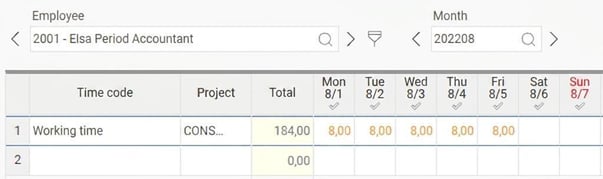
- Save.
Register attendance by form
|

|
Register absence
- Click on the absence manager:
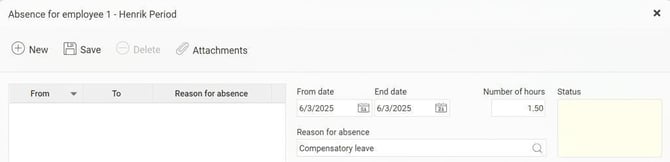
- For absence part of day, specify the date and number of hours as well as select reason for absence:
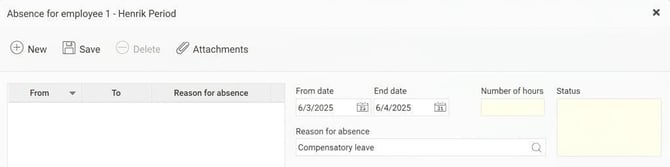
- For full days, only the date is specified. If the absence covers several days, it is not possible to adjust the number of hours.
- It is also possible to leave a message explaining the absence:
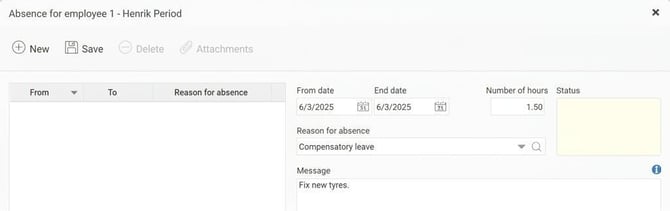
- Save.
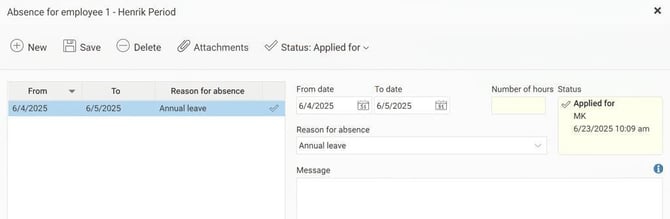
- If the absence must first be approved, it will receive the status Applied for and go to your manager. As soon as the absence is approved, it will be generated in the time report.
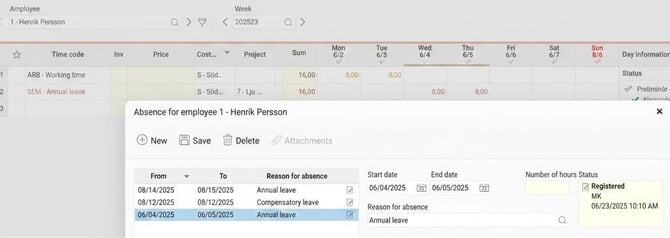
- If the absence does not need to be approved, it will receive the status Registered and will be visible in your time report immediately.
Register overtime
- Mark the time code field on an empty row and search for Overtime.
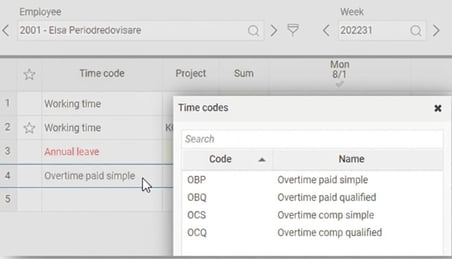
- Select the correct type and enter the number of overtime hours for the correct day.
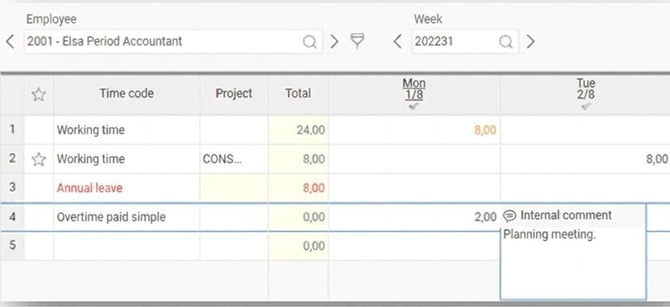
- Save.
Please note: This article is AI-translated. This means that linguistic errors or misunderstandings may occur.