
Balance roof/floor is used to set a roof and/or floor for balances, and specify what should happen if the roof is exceeded or the floor is undercut.
You can set the balance roof/floor at company, time group or employee level. The most specific applies. If there is a setting for the same balance at time report, time group and employee level, the setting at employee level will apply.
Only rolling balances can have a balance roof/floor. This is because the limit is checked at the start or end of a period, and period-specific balances are already handled at that point.
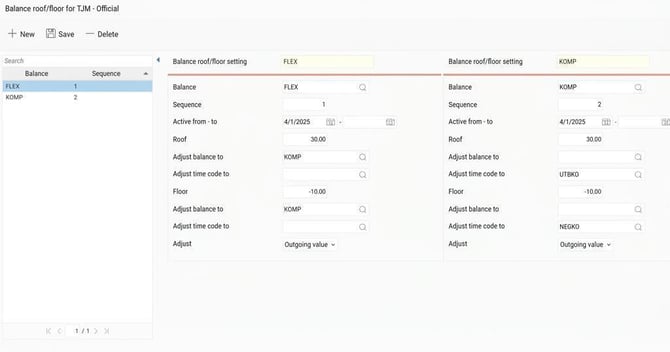
ExampleIn the example below, the roof for both flex and comp is 30 hours, the floor is -10.
If I earn or take out too much flex, I should instead receive/take from comp. If I were to exceed 30 hours comp, the excess hours are placed on a time code that is linked to a pay code that provides allowance. If the comp balance drops below -10, it is placed on a time code that will generate a payroll deduction instead.
It's important that the flex balance roof/floor comes first in the order, otherwise the flow will not function as intended.
It's also important to use the minus sign, as the floor can be set to a positive value.
So: You specify the floor as -10 since you should be able to have ten minus hours before adjustment. Had the floor been specified as 10the adjustment would take place when the balance is +10 hours.
The time codes used for adjustment are usually undefined, so they don't give extra attendance or absence. The pay codes that transfer the adjustment to payroll should not be connected to a reason for absence. The intention is to have a deduction in payroll, not an absence, as that would cause issues in the calendar.
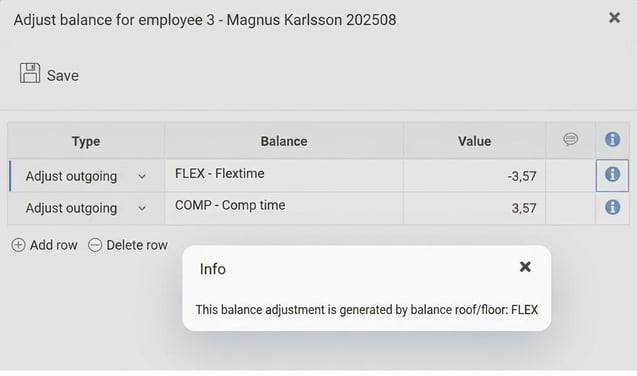
When the balance roof/floor has been triggered, it is visible in the time report under Adjust balances. The info icon indicates that the adjustment comes from the balance roof/floor.
The image below shows the result when the flex balance has exceeded the roof. A flex balance of 33.57 hours has been adjusted down to 30, and 3.57 hours were then added to the comp balance.
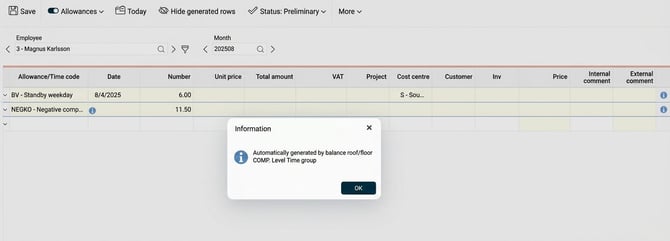
When the adjustment is added to a time code, this is shown in the time report on the Allowances tab. Here, you can see at what level the balance roof/floor setting is in place so you can track it.
Related articles
How do you set up time codes?
How do you set up balances?
Please note: This article is AI-translated. This means that linguistic errors or misunderstandings may occur.