
Which app should I use?
|
The mobile app HRM Mobile has been available for some time now. We are currently developing a brand new, fast, and user-friendly Flex HRM app with a completely fresh design. The new app is being developed and will continuously gain more functions. You can read more about it in the article What is the Flex HRM app and why are there two apps? |
 |
In the Flex HRM app, you can scan a receipt and save an expense draft.
Scan receipt and save expense
When you click on the Scan receipt menu, you can choose to upload a receipt from your gallery, from saved files, or open the camera. If the app does not have authorisation for the camera, you will be asked about this and can choose to allow it.
Point the camera at the receipt and click the button to take a photo. You may then choose to take a new picture or proceed to record an expense with the photo taken.
An expense code is suggested based on the interpreted receipt. If several codes match, these will be suggested and you can select one of them, or display a list of all expense codes
You will then be able to enter a purpose (for entertainment) or comment (for other types of expenses), and check the expense code, date, amount and VAT. You can also link accounting codes, such as cost centers or projects. If something is incorrect, you can change it before saving by clicking Create expense.
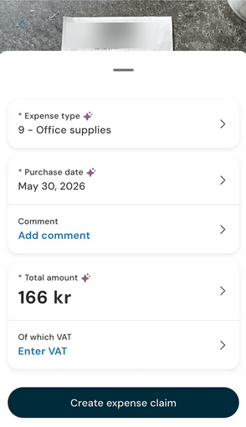
If the expense code is of type entertainment you will also have the option to specify participants and tips.
If the expense code has a connected code, it is displayed on a read-only line below the total amount.
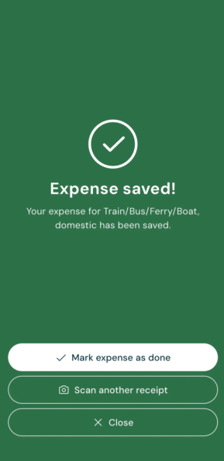
Once you have saved, you will see a confirmation that you have created an expense and can choose to scan another receipt or navigate to the front page.
The expense is saved to an existing travel expense claim if you have a travel expense claim with status preliminary, otherwise a new travel expense claim will be created where the expense is saved. Under Added to travel claim, it shows which travel claim the expense will be saved to, including the travel claim number and purpose. If no preliminary travel claim exists, information will be displayed indicating that a new one will be created.
You can click the Added to travel claim field if you want to change the default setting. You can then select a different travel claim, if there are multiple preliminary ones, or choose to create a new travel claim.
Mark expense as done
Once you have saved an expense and there are no other items on the same expense report, you can choose to mark it as completed.
If you choose to mark it as completed right away, you won't need to process the expense again—it will proceed to the remaining approval steps.
If you choose not to mark it as completed right away, the expense is saved, and you will need to mark the travel expense claim as completed at a later time.
If you want to gather multiple expenses on the same travel expense claim, do not mark it as completed immediately. Instead, you can scan additional receipts, create expenses, and mark the travel expense claim as completed later in the Expenses view or in the web version of Flex HRM.
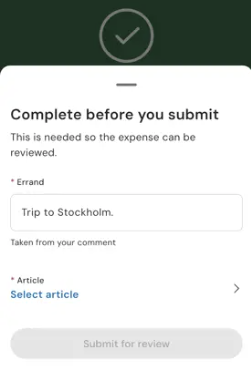
If an errand or any cost allocation is missing for the travel expense claim to be completed, you will have the opportunity to add this information. When you click Mark expense as done, the missing details will be displayed, and you can fix them directly. If an errand is required for the travel expense claim, an errand will be suggested based on the expense comment, but you can change it if needed.
Can the app interpret receipts when I shop abroad?
Yes, the currency is also interpreted from the receipt. When you take a photo of a receipt with a foreign currency, the app interprets the currency directly from the receipt. The currency code is automatically identified, for example EUR or USD. The current exchange rate is fetched and displayed in the expense view.
Exchange rates are updated once a day.
The total amount shows the interpreted amount in the currency you paid with. The app also shows how much you will be reimbursed, as well as the exchange rate the calculation is based on.
If the app has interpreted the currency code or the amount incorrectly, you can manually correct the details before saving.
See balance before saving
When you use an expense code associated with a registration rule with a balance in Flex HRM, you can see your balance before saving. This often applies to balances for wellness allowance (friskvård). You will see the balance limit, how much you have used previously, and how the new expense affects the balance.
The balance deducts all expenses you have already registered that count towards the balance. This applies regardless of whether your previous expenses have been reviewed/paid out or not.
The balance updates when you enter the amount for the expense. The box shows how much you will have remaining after saving, for example, SEK 959 left after the expense.
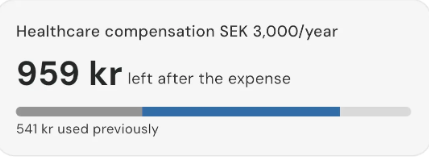
Below the amount, a bar with three parts is displayed:
- Dark grey section: Shows what you have used previously, for example, SEK 541 used previously.
- Blue section: Shows how much the current expense takes from your balance.
- Light grey section: Shows your remaining balance after the expense.
Warning if you exceed the expense limit
You will see immediately if the expense causes you to exceed your balance cap:
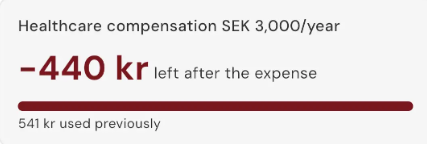
- The amount is shown in red with a minus sign, for example, -440 SEK left after the expense.
- The entire bar turns red.
- The Create expense button cannot be used, preventing you from saving the expense.
To save the expense, adjust the total amount so that it fits within your remaining balance.
Why is the "Scan receipt" menu missing?
Can't you see the Scan receipt menu? Check your license and permissions. To scan receipts in the Flex HRM app, a license for HRM Travel and permission to register expenses are required.
The company must also have configured the use of Expenses & Entertainment under Settings > Travel > Travel expense claims > Travel expense view: Transaction types.
Please note: This article is AI-translated. This means that linguistic errors or misunderstandings may occur.