
The SSB Self-notification report is only available for companies with home country Norway.
The report SSB Self-notification can be used to produce quarterly statistics based on absence of the type Self-notification.
Create the report
- Go to Reports > Time.
- Make your selection for employees, home account code and/or time group. If you do not make a selection, all employees will be included.
- Select year and quarter.
- Click on Print to display the report, or Download to retrieve it in CSV format.
What the report shows
All values are distributed by men, women, and in total.
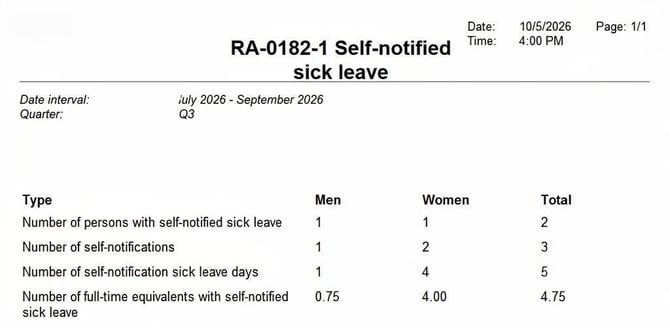
- Number of people with self-notification sick leave: Number of employees who have had at least one self-notification during the quarter.
- Number of self-notification days: Number of absences.
A self-notification that began during the previous quarter is not counted as a new case. - Number of self-notification sick leave days: Number of scheduled days with absence due to self-notification.
- Number of workdays with self-notification sick leave: Number of workdays, taking into account contractual working hours and self-notification for part of a day.
Example 1
An employee with a 75% contractual working hours has one day of self-notification.
The report shows:
| Number of people | 1 |
| Number of self-notification days | 1 |
| Number of self-notification sick leave days | 1 |
| Number of workdays with self-notification sick leave | 0.75 |
Example 2
An employee with 100% contractual working hours is scheduled for 8 hours per day. She registers a self-notification with two full days as well as 2 hours on the third day.
The report shows:
| Number of people | 1 |
| Number of self-notification days | 1 |
| Number of self-notification sick leave days | 3 |
| Number of workdays with self-notification sick leave | 2.25 |
Good to know
- Number of people and number of self-notification days are based on audited absence applications with absence reason Self-notification. Non-audited applications are not included. Absence that does not require audit is automatically considered audited.
- Number of sick leave days and number of workdays are calculated for scheduled days where the time report contains self-notification time codes for all or part of the day. The calculation is based on the employee's schedule. Contractual working hours must be specified in the employee register.
- Missing gender in the register: If gender information is missing in the employee register, the value is set to Unknown. The report only summarises employees with registered gender (Male or Female). Therefore, the person will not be included in the columns for men, women, or total, which means the absence is excluded from the SSB data.
Please note: This article is AI-translated. This means that linguistic errors or misunderstandings may occur.