
You can manage your time reporting in the Flex HRM app. Click on the calendar in the bottom menu to open today's date.
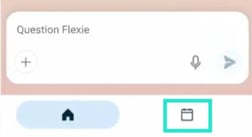
The calendar is initially shown only for users with day reporting. If you use period reporting, you cannot yet manage your time report in the app.
|
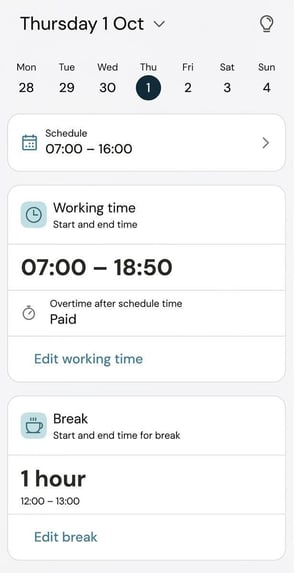
You can change the date in the calendar (click on the row with the day of the week and date at the top) or by swiping horizontally in the date row. The day is divided into the following sections: Schedule Working time Break |
 |
|
Absence
|
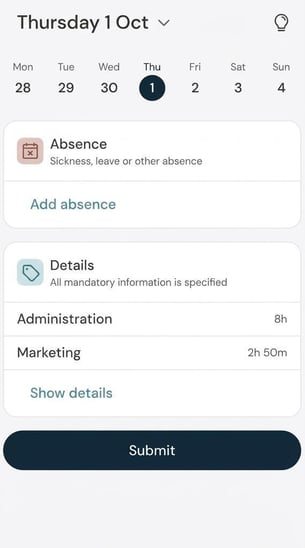 |
Here, we use the term submission for the first audit level in the time report. It may be called something else in your system.
How are balances shown?
On the card Balances you can see how the day affects your time balances. To make the day view easier to follow, by default, you see a maximum of three balances, but you can click on an arrow to show all balances that should appear according to your layout settings balances (Settings > Time and Plan > Balances > Layout settings balances).
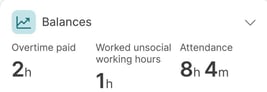
The balances shown by default are those changed by the day.
For example: On a day when you haven't worked overtime, you won't see the overtime balance.
If you expand the balance view with the arrow, you see all balances, even those unaffected by the day.
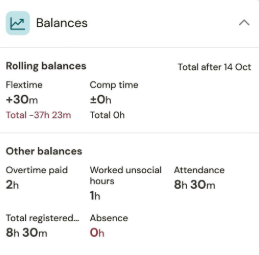
When expanded, your rolling balances and other balances are displayed.
Rolling balances are balances not reset at the end of the month but continue rolling, such as the flex time balance. Rolling balances show theday's change as well as the total balance until today's date.
Other (period-bound) balances show the day's value.
If you have time codes under the time report's folder Allowances that affect balances, this is not visible when balances are in their first state, where a maximum of three balances are displayed. When you click on the arrow to expand so that all balances are displayed, you also see the impact from time codes under the Allowances folder.
Why can't I report time in the app?
Is the calendar missing from the bottom menu in the app?
The calendar is initially shown only for users with day reporting. If you use period reporting, you cannot yet manage your time report in the app.
You can check your registration type yourself in HRM Time. If you see a folder called Day view in your time report, you are a day reporter. If you only see Weekly view and Monthly view you are a period reporter.
To report time in the Flex HRM app, you also need a licence for HRM Time and to be authorised to edit your time report.
Please note: This article is AI-translated. This means that linguistic errors or misunderstandings may occur.