
You can find this function under Payroll > Payroll process.
Click on +Payroll runs > Complete and then select the tab Payroll transfers.A window appears where you can select the Current payroll run or other payroll runs to see which transactions have been downloaded from HRM Time, HRM Travel or imported files.
You choose whether to show log information for All payroll runs or just the Current payroll run.
- Current payroll run - only shows information about transactions imported for any employee in the selected payroll run.
- All payroll runs for the current payment group - shows information for all payroll runs for the payment group.
- All payroll transfers for all payment groups - shows information for all payroll transfers, including transfers that have not generated any transactions in a payroll run.
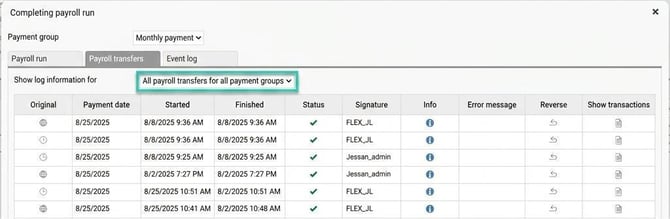
The list shows which system the transactions have been imported from in the field Original, date and time point for the transfer, responsible user and the status of the actions processed. Click on the blue information icon to display additional details; here you can, for example, download the file that was imported during fileimport.
To view the transactions, click the document icon in the column Show transactions for the requested row. This opens a new window where you can see the transactions in list form.
You can also access the same view via Actions processed > Service routines > Downloaded original transactions for payroll runsand there you can select which transfer you wish to see in the field Payroll transfers.

Please note: This article is AI-translated. This means that linguistic errors or misunderstandings may occur.