
Basic settings

Information at individual level

Pay code settings
Basic settings
The first step is to activate the settings for reporting to Fora in the current company under Administration > Settings > Payroll > Pension and insurance.
In the list on the left, you can see the company's active reports to the various pension providers. If Fora is not in the list, click the button New and fill in the information in the form to activate reporting to Fora.
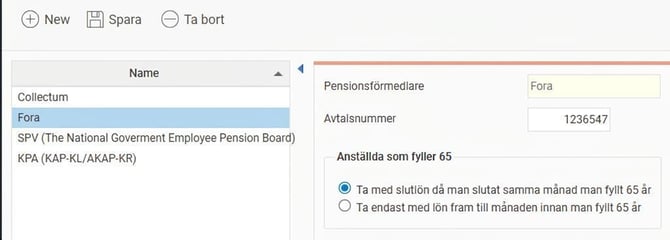
Here you can specify the following details:
- Agreement number
To report via file to Fora, you need to specify the agreement number with Fora that applies to your company. The agreement number is unique for each company. - Employees reaching 65
For employees who retire in the same month they turn 65, the general rule is that only wages up to the month before turning 65 should be reported as the pensionable base to Fora. However, this means the employee misses out on a pension for pay received in the same month and the month after leaving. Therefore, you can choose here to include final salary when an employee leaves in the same month as turning 65. - Accumulator for ingoing value
If you start using Flex HRM Payroll during the year and do not have historical data in the form of payroll runs in the system, the pensionable salary must be retrieved in another way. In this case, you can choose to fetch the ingoing value from a specified accumulator.
Information at individual level
In the employee register, under the Pension & insurance tab, specify the terms applicable to the employee when reporting to Fora.
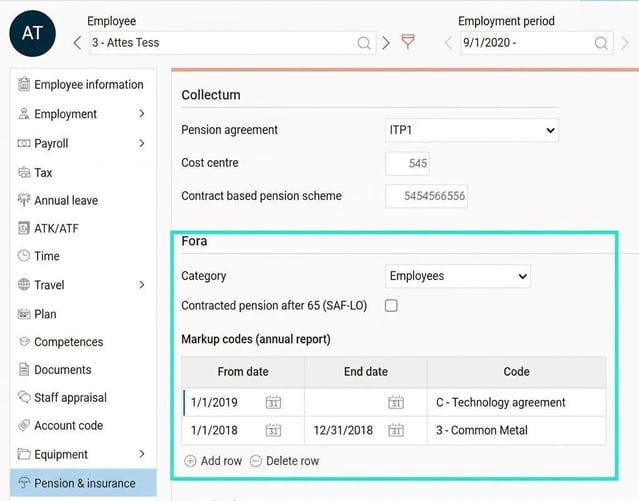
Here you enter the following details:
- Category
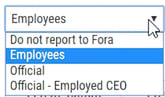
Here you state whether the employee should be reported to Fora by indicating whether the employee should be registered as Employees or Official in accordance with Fora's instructions. For an Employed CEO who should be reported as an official, select Official > Employed CEO.
- Contracted pension after 65 years (SAF-LO)
For employees who continue working after the age of 65 and who are to continue earning contracted pension according to agreement. This means that the payroll specification continues to be reported to Fora after turning 65. - Marking code
For employees covered by a collective agreement that includes a supplementary pension premium, these employees must be tagged with a marking code. Here you enter the date range during which the employee was covered by a given agreement. In the code field, you can enter to search or open the list with all available agreements.
Pay code settings
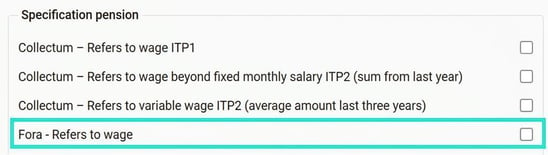
To report pensionable salary for Employees and Officials to Fora, data must be retrieved from certain selected pay codes. You indicate which pay codes are pensionable by ticking the checkbox Fora - Refers to wage under the tab Payroll in the pay code register.
Related articles:

Pension reporting (annually) to Fora - How do I handle pension reporting to Fora in Flex HRM Payroll?
Please note: This article is AI-translated. This means that linguistic errors or misunderstandings may occur.