
This product is under development. The content of this article will be updated as new changes occur.
How do you analyse wages for equal work?
In this view, you compare employees performing the same or almost the same duties. This is where we ensure that women and men with the same job profile receive equal pay.
Here's how to do it step by step
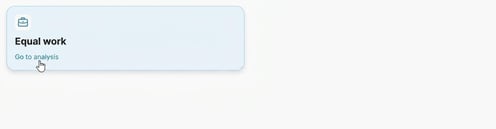
You will find the analysis under Pay Equity Compass > Pay Equity Navigator select Equal work.
-
Select job profile: In the list, you'll see all the works where there are both women and men represented. Click on a profile to view the details.
-
Audit the statistics: You will now see the average wage for women and men within the work, as well as the percentage wage difference.
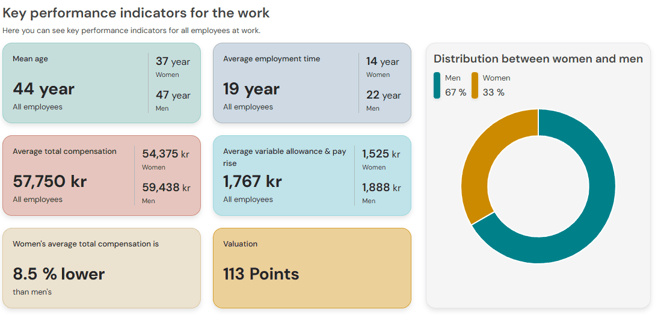
In the individual key figures, you can see even more detailed statistics.
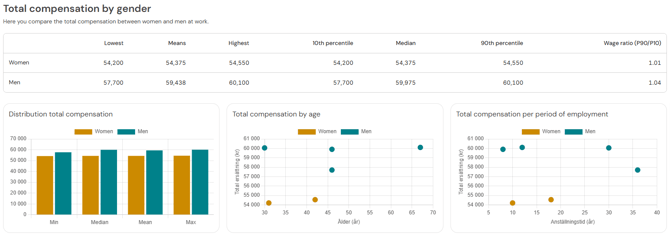
For each work, you can add a note and/or flag that an action is required. If you flag a work for action, it will appear in the action list in the Pay Equity Navigator Documents & actions. If you unflag a work for action, it will be removed from the action list, which also means that any changes made to the work within the action list will be deleted -
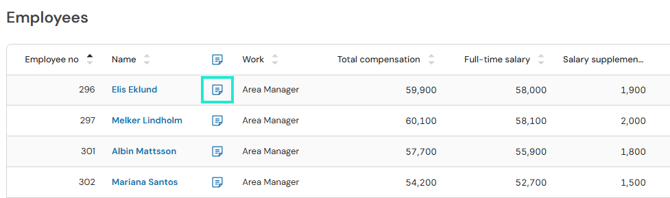
Go down to individual level: Below the key figures, you’ll find a list of all employees. The list displays all employees belonging to the current work. Here you can see factors affecting pay, such as period of employment.
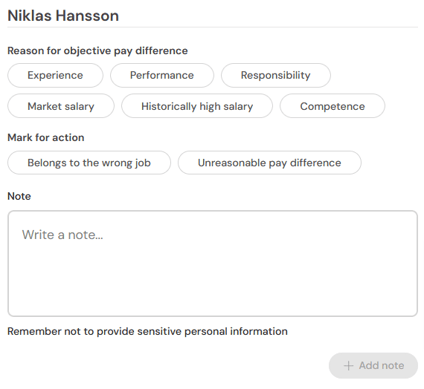
For each employee, you can specify a note and specify individual reasons for a wage difference. Click on the note icon.
-
Specify reason for wage difference, mark for action and/or make a note.
Related articles
Get started with the Pay Equity Compass – Checklist
Please note: This article is AI-translated. This means that linguistic errors or misunderstandings may occur.