
Events are constructed using formulas and are used to generate time codes or allowance codes in the time report on a given tab, based on certain prerequisites. Allowances. Formulas can be written for a separate event, or you can use General formulas for events which can be applied to several events.
The AI assistant Flexie can help you both to understand formulas and to write them. Read more in this article: How can Flexie help you with formulas in Flex HRM?
Events are complex. We recommend that you, if needed, seek assistance from a consultant at Flex Applications to write the formulas required for your event.
In the view General formulas for events you can create formulas for events and define which functions in HRM Time are allowed to use the formula. Some formulas may, for example, be intended for use only on specific bank holidays, or can be added only for specific employees. General formulas for events can be used at the following levels:
- Company.
- Time group.
- Employee.
- Day schedule.
- Public schedule.
- Account code.
- Bank holiday.
Use the field Description to explain the formula, which makes future use easier.
The button Function formula opens a popup listing the available function formulas.
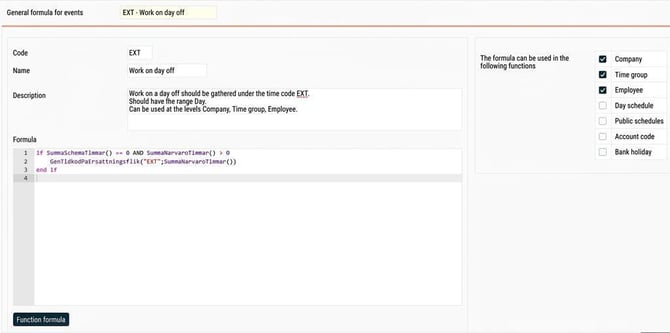
In the example above, there is a general formula for events that sums time worked on a day off for the time code 'EXT'. This formula should be usable at company, time group, and employee level.
This formula will have no effect as long as it exists only as a general formula for events. It is only when you create an event that it can generate the time code in time reports.
Related
Formula language in Flex HRM
How do you use Events in HRM Time?
Please note: This article is AI-translated. This means that linguistic errors or misunderstandings may occur.