
Discrepancy reporting is a simpler type of time reporting, where the employee only enters discrepancies from their normal schedule. When using discrepancy reporting, normal working hours are not displayed in the time report.
Tips
If you want to see all hours, you can use period reporting with the setting Add times according to the schedule. Scheduled time will then be automatically added as working time in the time report, and you report what is different, such as absence and overtime. Read more about working with period reporting here.
Discrepancy reporting is managed in the view Discrepancies. You enter discrepancies for individual dates or for a date interval.
To the right, you can see a total of discrepancies for a selected period. Click on a row to edit it in the input screen to the left.
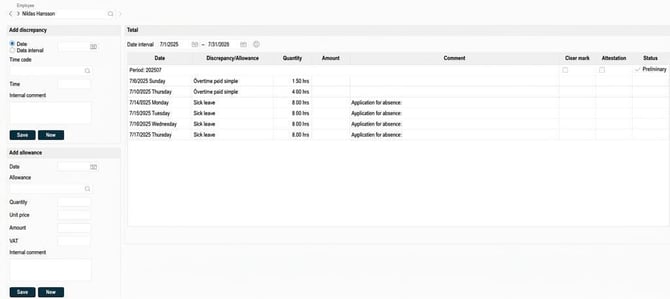
Under Add allowance you can register allowance codes. These also appear in the total.
You also have the option to audit the current period.
Please note
Only the audit levels you are authorised for in relation to the employee will be shown here. The names of the audit levels are selectable and can therefore differ from those shown in our example.
Related articles
Work with period reporting
Concepts in HRM Time
Please note: This article is AI-translated. This means that linguistic errors or misunderstandings may occur.