
This product is under development. The content of this article is updated as new changes are made.
You can migrate the following
When performing a migration, there are mainly two parts that are transferred to the new module:
-
Job profiles
-
Work evaluation
Important to know before you start
There are a few things you should be aware of to ensure the migration works as expected:
-
No existing analysis: In order to carry out a migration, you must not have previously created a Pay Equity Navigator in Pay Equity Compass.
-
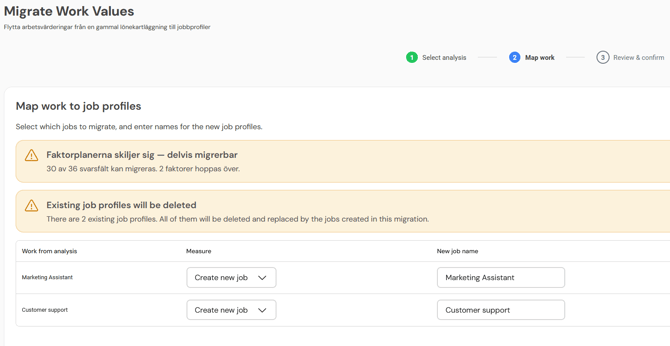
Started job profiles are removed: If you've started job profiles before running the migration, these will be removed when the migration is completed.
-
Imported points: If you have previously used imported ready scores (i.e. if you have not conducted the actual work evaluation in Flex HRM), you cannot migrate these. Instead, you will need to do a new work evaluation in Flex HRM Pay Equity Compass.
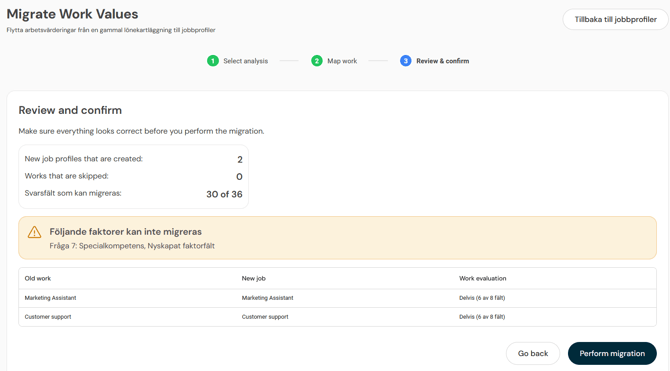
- When the factor plan differs between the old and the new system, it may only be possible to perform a partial migration.
You will receive information about mismatches before proceeding with your migration.
How to carry out the migration
You will find the function to move your data under Pay Equity Compass > Job Architecture. Click on Manage work profiles and then on Migrate evaluations.
Follow these steps to complete the process:
-
Select source: Mark the old Pay Equity Navigator containing the settings you want to use and migrate.
-
Select content: Choose which works and names of the works you want to transfer to Pay Equity Compass. These will become the new job profiles.
-
Audit: Check that all information appears correct.
-
Complete: Click on Complete migration to finish the process.
Related articles
Get started with the Pay Equity Compass - Checklist
Please note: This article is AI-translated. This means that linguistic errors or misunderstandings may occur.