
Settings at company level

Assignments at individual level

Pay rise

Special handling for County museums

Pay code settings
Settings at company level
The first thing you need to do is choose whether reporting is to be done to SCB, Svenskt Näringsliv (SN) or Sobona. This is done under Administration > Settings > Payroll > Wage statistics.

If you submit the statistics via an employer organisation, there are often slightly different discrepancies compared to the legally mandated collection for SCB. In Flex HRM Payroll we support 13 variants for Svenskt Näringsliv (SN) and Sobona according to the following list.
- Statistics Sweden (SCB)
- Svenskt Näringsliv (SN) – Standard
- Svenskt Näringsliv (SN) – FAO (MO 48)
- Svenskt Näringsliv (SN) – Installatörsföretagen (MO 25)
- Svenskt Näringsliv (SN) – Biltrafikens arbetsgivarförbund (MO 31)
- Svenskt Näringsliv (SN) – Grafiska Företagens Förbund (MO 38)
- Svenskt Näringsliv (SN) – Plåtslageriernas Riksförbund (MO 42)
- Svenskt Näringsliv (SN) – Industriarbetsgivarna - sawmill industries (MO 56 001)
- Svenskt Näringsliv (SN) – Industriarbetsgivarna - pulp and paper industries (MO 56 002)
- Svenskt Näringsliv (SN) – Industriarbetsgivarna - mining industry (MO 56 003)
- Svenskt Näringsliv (SN) – Industriarbetsgivarna - welding mechanical agreement (MO 56 004)
- Svenskt Näringsliv (SN) – Industriarbetsgivarna - steel and metal (MO 56 005006)
- Svenskt Näringsliv (SN) – Kompetensföretagen (MO 87)
- Sobona (formerly KFS)
- Svenskt Näringsliv (SN) – Byggföretagen (MO28)
Depending on whether reporting is to be done to SCB, SN or Sobona, a number of additional fields are displayed; "Work Place (CFAR-number)" and "Is there an agreement for separate weekly pay".
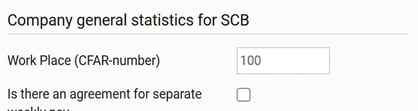
General company data for SCB:
- Work Place (CFAR-number)
Here you can specify a workstation number to be used as standard for All employees unless something else is entered in the Employee register. - Is there an agreement for separate weekly pay
Tick if you are to report to SCB that there is an agreement for separate weekly pay for Employees with hourly wage.
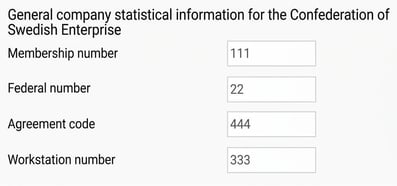
For Svenskt Näringsliv you specify Membership number, Federal number, Agreement code and Workstation number. In the Employee register, you can then specify deviating Federal number, Agreement code and Workstation number. Workstation number is Svenskt Näringsliv's equivalent to SCB's Work Place number (CFAR). When reporting to SN, Both must be specified.
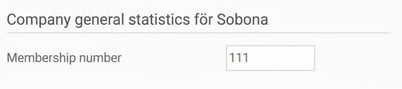
For reporting to Sobona, specify the membership number you have received from them.
Assignments at individual level
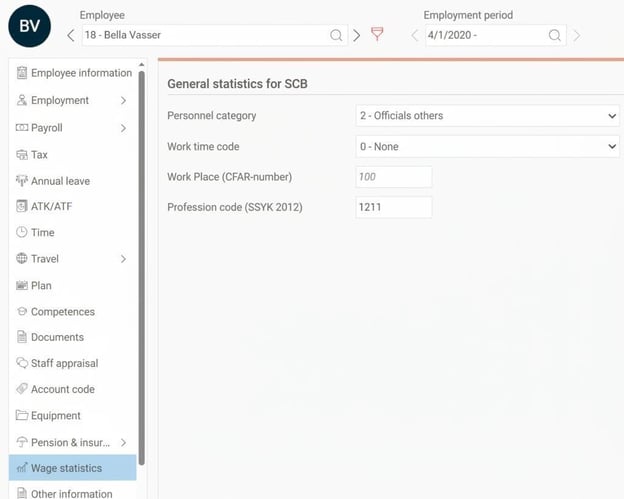
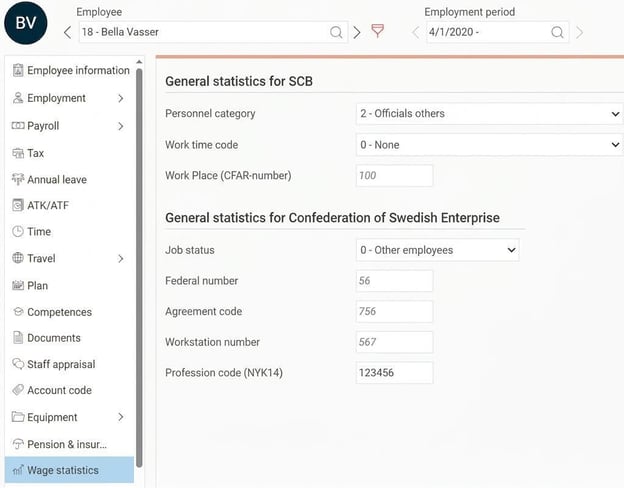
In the Employee register, under the tab Wage statistics, you enter the information about the Employee that is to be reported. Depending on whether you report the assignments to SCB or SN, a varying number of fields are displayed.
Information about Personnel category, Work time code and Work Place (CFAR-number) must Always be submitted. For reporting to SN, information regarding Job status, Federal number, Agreement code and Workstation number is also required.
Work Place (CFAR-number), Federal number, Agreement code and Workstation number only need to be entered if the Employee has a deviating assignment compared to what is set at company level (see previous section). The company's standard assignment is shown as grey italic text if no value is set manually. This way, you don't have to enter these assignments for All employees.
Regarding the ProfessionCode, different assignments must be reported to SCB and SN respectively. When reporting to SCB, ProfessionCodes according to SSYK 2012 must be entered. For reporting to SN, the equivalent NYK14 must be used instead.
SCB and Svenskt Näringsliv also have different markups for work places/workstations. Therefore, there is a field for SCB, Work Place (CFAR-number), and a field for SN, Workstation number. When reporting to SN, Both assignments must be specified.
Example of reporting to SCB:
Example of reporting to SN (standard):
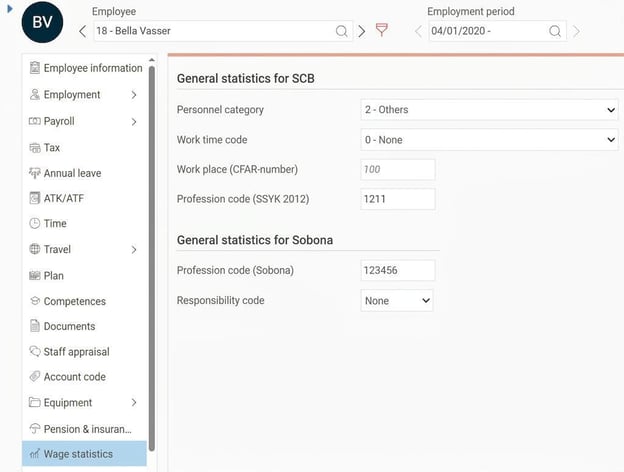
A 6-digit ProfessionCode specific to Sobona must be reported for each Employee in the Employee register, in addition to the usual SSYK code for SCB. For certain ProfessionCodes a Responsibility code must also be specified.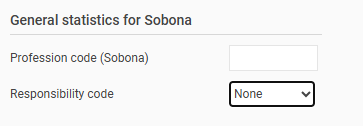
Example of reporting to Sobona:
Wage rise
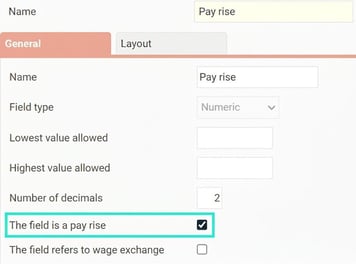
In order to report the agreed fixed monthly salary, including fixed increments, we need to know which fixed pay rises are being used in the company. To do this, we use Additional fields that are defined under Administration > Settings > Personnel > Employee register - additional fields.
For all fields to be counted as a pay rise, tick the setting "The field is a pay rise". If you have several fields for pay rises, tick All fields.
Special handling for County museums
For County museums, there is a special handling for wage type for Employees with wage subsidy. For these, you must specify wage type 4 and 5 instead of 1 and 3 (monthly salary/hourly wage). To process this, there is a check box on the type of employment to indicate it is Wage subsidy for County museum. You access the setting via Administration > Personnel > Types of employment.

Pay code settings
To distinguish between different allowances and worked time, you need to specify for different pay codes how they are to be reported in wage structure statistics. This is controlled by a number of check boxes found on the tab Payroll in the pay code register under the heading Specification for AGI and wage statistics. All settings apply for reporting to SCB, SN and Sobona.
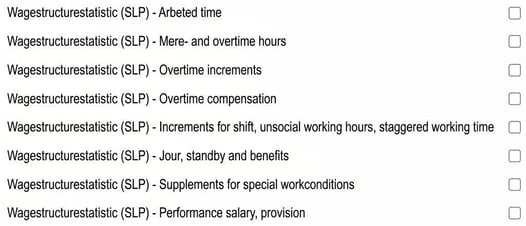
The following applies for each check box:
- Worked time
Used for summary of Number of hours worked (control code 001). - More- and overtime hours
Used for summarising Number of more- and overtime hours (control code 002). - Overtime supplement
Used for reporting overtime supplement (control code 052). - Overtime allowance
Used for reporting overtime allowance. Should be used when the pay code includes both base wage and overtime supplement (control code 053). - Increment during shift, unsocial working hours, shifted working time
Used for summarising increments during shift, unsocial working hours, and shifted working time (control code 054). - Jour, standby and benefits
Used for summarising jour, standby, and Benefits (control code 055). Pay codes with this check box of the type Benefits are subsequently reported separately in a specific field (control code 057). - Supplements for special work conditions
Used for summarising increments for e.g. risk, dirt, heat, cold (control code 056). - Performance salary, provision
Used for summarising Paid performance salary and provision (control code 058).
For certain member organisations within SN, there is Inquiries that must be reported, which requires additional check boxes to identify the different allowances.
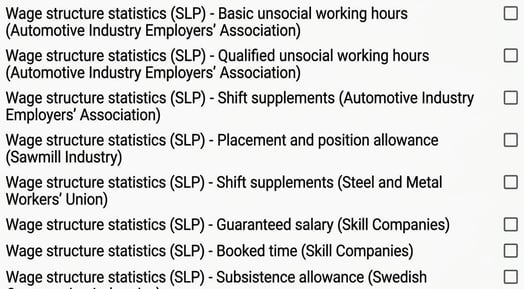
Read more about the sector-specific discrepancies under the heading Discrepancies and increments in The report How is the specification for wage structure statistics for the private sector (SLP) calculated?
Related articles

Wage structure statistics for the private sector (SLP) - How do I generate statistics for SLP in H
RM Payroll?

How is the specification for wage structure statistics for the private sector (SLP) calculated?
Please note: This article is AI-translated. This means that linguistic errors or misunderstandings may occur.