
In-depth information on how the data is generated
Below you will find detailed information on how the data is created in the system.
Which details are included for each reporting type?
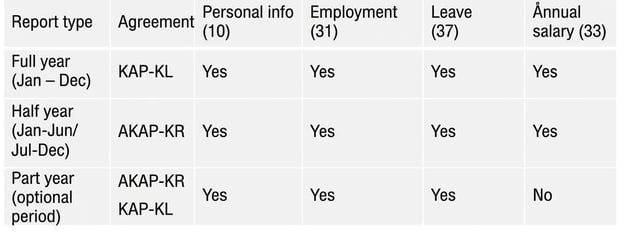
In the table below, you can see which post types and which agreements are included in the various reporting types.
Which employees are included in the data?
An employee is included if any of the following conditions are met:
- The employee has at least one employment day during the period from 1 January until the end of the reporting period, with the KAP-KL or AKAP-KR agreement and a Form of Employment set up with KPA employment code.
- For KAP-KL, employments that start after the employee turns 69 are not counted.
- For hourly employees, there must also have been at least one work period registered.
- Pensionable salary paid outside an employment period but within the reporting period, and if there was earlier an employment under KAP-KL or AKAP-KR (final salary). However, this does not apply for interim reporting when salary should not be reported.
Work periods for hourly employees
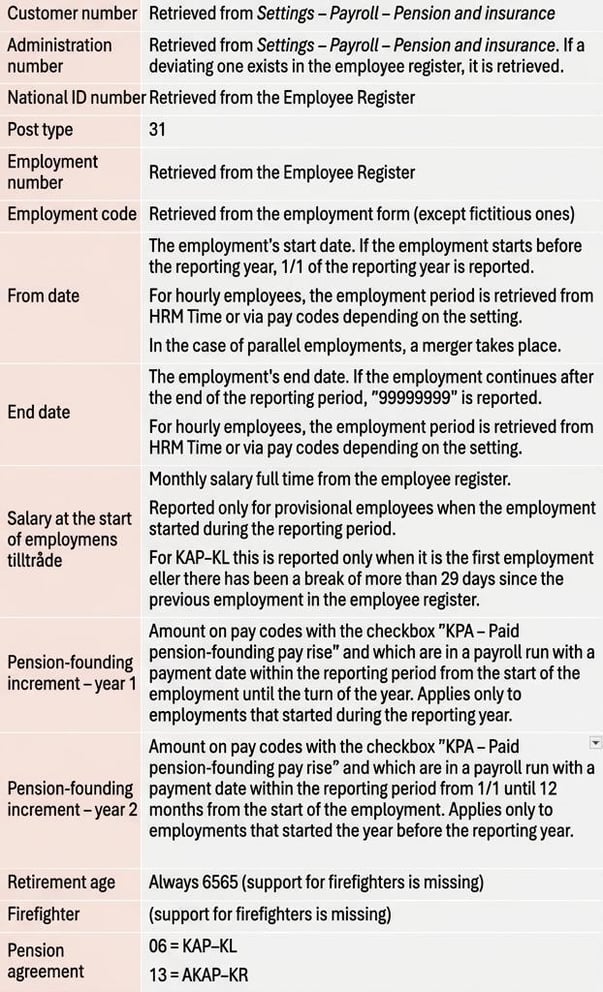
For hourly employees, a unique employment period should be reported for each occasion the employee is in and working. If work is carried out on several consecutive days, it is considered a single occasion. Days when the employee has been sick or on leave of absence should also be included.
There are two selectable solutions for how work periods for hourly employees are retrieved. Read more about these in the section Settings – Basic settings.
If you choose to retrieve work periods from HRM Time, a day is considered a workday if it has a time code of type Attendance, or if there is an absence of type sickness or leave of absence on that day. There will be a break during work-free weekends.
If you choose to retrieve work periods via pay codes, remember that both sickness and leave of absence should be counted as worked time.
Logic for merging parallel employments
Employment periods are reported with associated salary for each period. If several consecutive employments occur during the year, each is reported separately with its respective salary. If the employee has two or more active employments (parallel employments) registered in the payroll system, these are reported as one employment and the pensionable income is combined into a single total amount. If both permanent employment and hourly employment exist in parallel, permanent employment should be reported as employment with salary for both employments. See KPA’s instruction for more details and examples of how merging should be done.
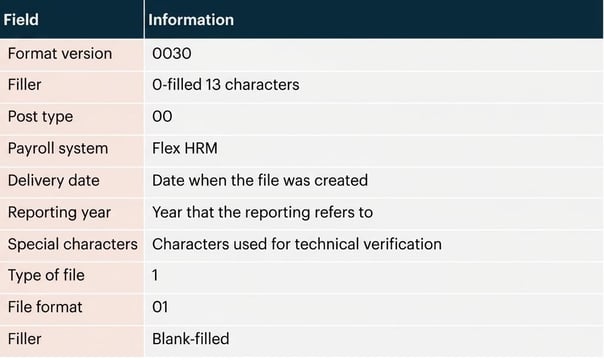
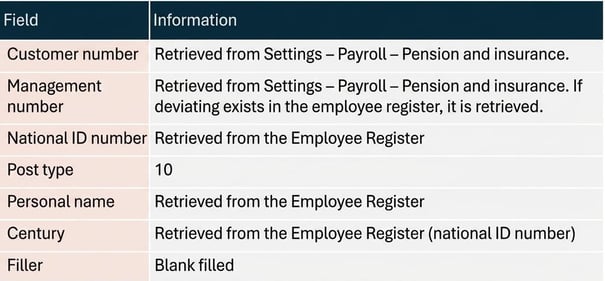
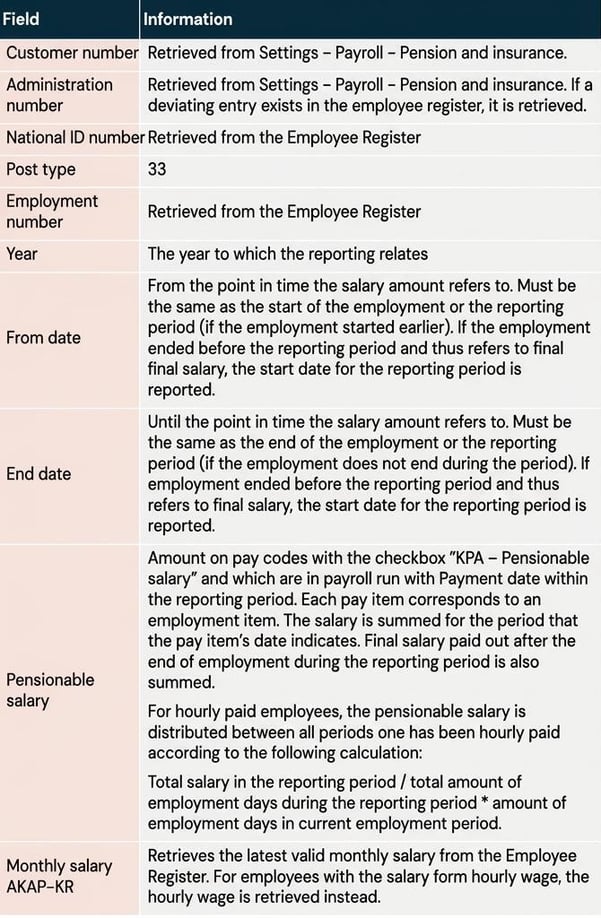
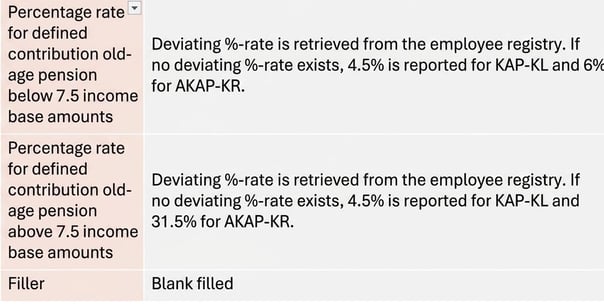
Field description
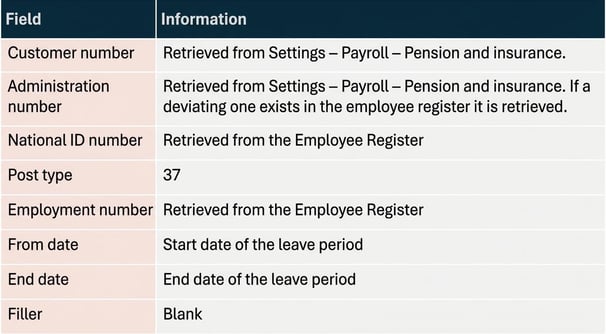
This section describes from where the information is retrieved for each field in the file’s various post types.






Leave details for KAP-KL and AKAP-KR (post type 37)
Leave refers to leave of absence with a 100% extent. Information about leave is retrieved either from HRM Time or via the calendar in HRM Payroll, depending on the setting under Settings – Payroll – Pension and insurance.
- Leaves from HRM Time
If HRM Time was selected, it is the reviewed absence applications of type leave of absence for full time that are retrieved. - Leaves from the calendar in HRM Payroll
If HRM Payroll was selected, it is absences of type leave of absence for full time that are retrieved from the calendar.
Related articles:

How do I make settings in HRM Payroll to be able to report to KPA (KAP-KL/AKAP-KR)?


How do I report pension data to KPA (KAP-KL/AKAP-KR) in HRM Payroll?
Please note: This article is AI-translated. This means that linguistic errors or misunderstandings may occur.