
Start and manage new assignments
Assignments for On boarding
Assignments linked to on boarding are usually started in New employment. Should an assignment for on boarding not be linked at the time of new employment, it can be connected to the employment period directly in the employment register.
Go to Personnel > Employees > Employment
Connect the correct assignment template next to the date of employment in the section for Assignment template On boarding
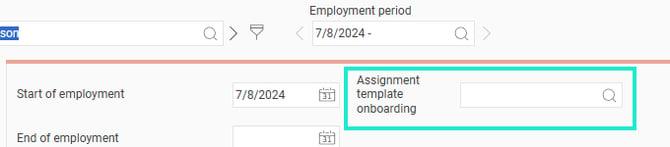
Assignments for Off boarding
Go to Personnel > Employees > Employment
When an employee is leaving, an end of employment date needs to be entered.
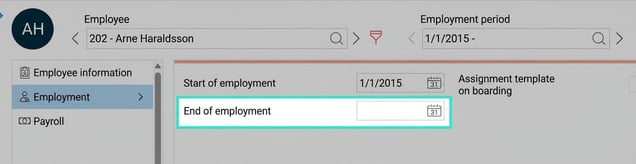
When the end of employment date is entered, the fields Assignment template and End of employment cause appear. Here you fill in the correct template/value from the list.

Standalone assignments
A standalone assignment could, for example, be a checklist for following up HR and payroll processes. The standalone assignments are created directly in the view Assignments.
The ability to start assignments/tasks directly from the Assignments view is controlled by permissions in the system.
Click on New.
Choose a template or create an assignment/task without a template by entering the desired details manually.
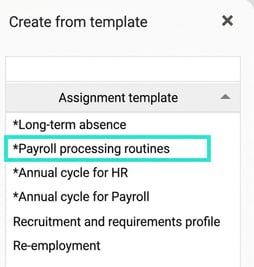
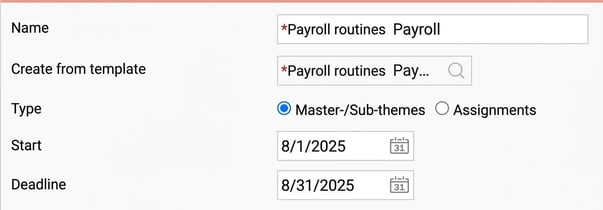
Go through the details to make sure you include everything required, such as information, responsible parties and deadlines for no later than the deadline.
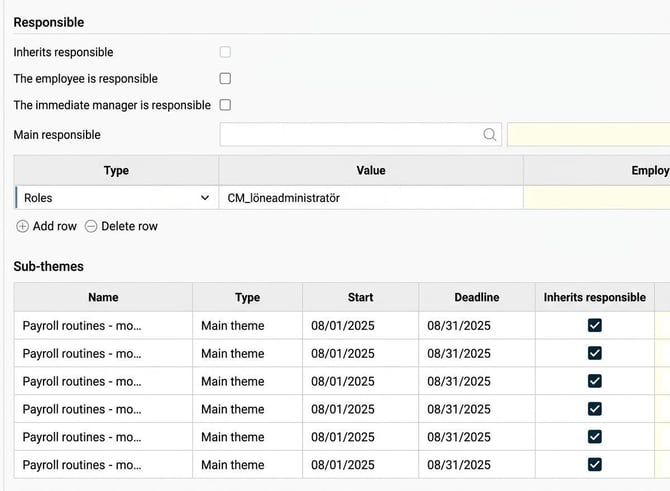
If you add Responsible in assignments/tasks, it is important to keep in mind that assignments to Roles, in the example above "Payroll Administrator", mean that everyone with that role is assigned the task. Then one of the payroll administrators must submit the task for it to be considered handled. It is therefore a shared responsibility.
Related articles
How do I manage tasks and assignments in HRM?
How does HRM Employee handle onboarding of employees?
How does HRM Employee handle offboarding of employees?
Please note: This article is AI-translated. This means that linguistic errors or misunderstandings may occur.