
Offboarding - End employment
Ending employment in Flex HRM
Go to Personnel > Employees > Employment
When an employee is leaving, an end of employment date needs to be entered.
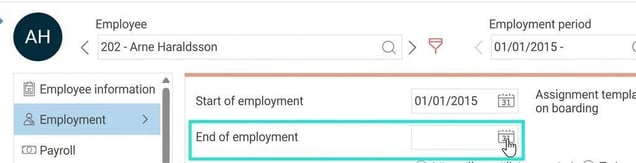
When you enter the end of employment date, the fields Assignment template and End of employment cause appear. Here you select the correct template/value from the list.

End of employment cause is used for statistics, LAS and employers certificate.
When you have linked an assignment template for off boarding, tasks are triggered for the responsible people regarding what should be done when an employee leaves.
How do I manage tasks during off boarding?
What does the warning that appears mean?
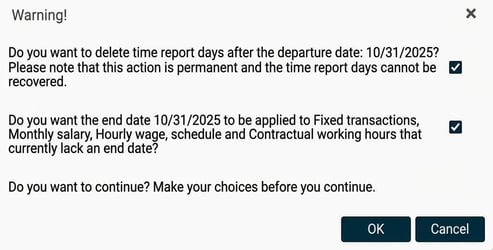
Read more about what this warning means here.
Related articles
How does HRM Employee onboard employees?
How do I manage tasks and assignments in HRM?
How does data purging/cleaning of employee information work in HRM?
How do I remove an employee?
How do I remove an employment period?
Please note: This article is AI-translated. This means that linguistic errors or misunderstandings may occur.