
Meter/Value (today)

- Used for the following types Number of employees, Average employment time and Mean age.
- Based on today's date.
If you choose to compare with the previous month a period is created, the current one, including all days in the current month up until today's date. The current period is then compared with the period for the entire previous month.
An example where we compare with the previous month where today's date is 2023-02-10 is:
Current period: 2023-02-01 - 2023-02-10
Previous period: 2023-01-01 - 2023-01-31

If you choose to compare with the previous year a period is created, the current one, including all months in the current year up to the month containing today's date. The current period is then compared with the period for the entire previous year.
An example where we compare with the previous year where today's date is 2023-02-10 is:
Current period: 2023-01-01 - 2023-02-10
Previous period: 2022-01-01 - 2022-12-31

Meter/Value (current period)
- Used for the following types Number of full time positions (FTP), Amount released for invoicing, Employee turnover and Sick leave.
- Based on today's date.
If you choose to compare with the previous month a period is created, the current one, including all days in the current month. The current period is then compared with the period for the entire previous month.
An example where we compare with the previous month where today's date is 2023-02-10 is:
Current period: 2023-02-01 - 2023-02-28
Previous period: 2023-01-01 - 2023-01-31
If you choose to compare with the previous year a period is created, the current one, covering the whole year in the current year containing today's date. The current period is then compared with the period for the entire previous year.
An example where we compare with the previous month where today's date is 2023-02-10 is:
Current period: 2023-01-01 - 2023-12-31
Previous period: 2022-01-01 - 2022-12-31
Meter/Value (optional period)
- Used for the following types Amount released for invoicing, Employee turnover and Sick leave.
- Based on today's date and looks at all complete periods backwards.
An example with 24 years back where today's date is equal to 2023-02-10 is:
Period: 1999-01-01 → 2022-12-31

An example with 24 months back where today's date is 2023-02-10 is:
Period: 2021-02-01 - 2023-01-31

Meter
You can also set minimum, maximum and normal values for the meter. This means the colours are adjusted according to your settings.
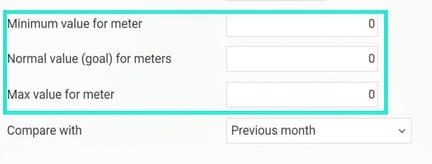
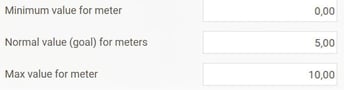
In the example below, where we have set the minimum value to 0, normal value to 5, and maximum value to 10, the target is for the average employment time to be at least 5 years, which is shown as the yellow area.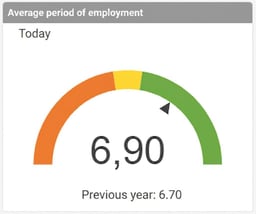
Colour
Some panels displaying graphs with lines or bars have settings for choosing colours.
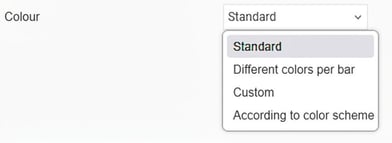
Standard - gives a blue colour.
Different colours per bar - gives different, HRM-selected, colours for each displayed bar.
Personal colour - allows a personal colour choice in a colour picker
According to colour scheme - gives the colour of the line or bar according to System colour for Side menu in the settings Colour scheme.
Related articles:

Dashboard - What is a Dashboard?

How do I present Dashboards on the Front page (Home)?

Panels in Dashboard - How do the shared settings for panels in Dashboard work?
Please note: This article is AI-translated. This means that linguistic errors or misunderstandings may occur.