
Schedule export of reports
You can schedule automatic withdrawals of reports you have created in the report generator. This means you can have the reports sent to a remote folder at specified times, in the same way as other exports in Flex HRM.
Step 1: Set up the report template for export
To use a report for scheduled export, you first need to set it up as an export template. You do this under the report template's sharing settings by selecting the option Use as report template.
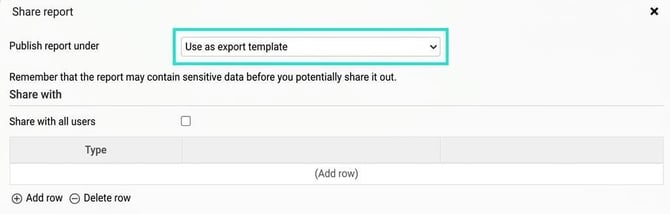
When you select this, the other sharing settings are locked. A report template used for export cannot be published as a standard report at the same time (however, it can be used in report packages). If you need to use the same template for both purposes, you can save a copy and publish the copy as a standard report.
Note! When you use a report template for export, it is automatically given authorisation for all employees. If you need to restrict the withdrawal, you must do so using selection directly in the report template.
Step 2: Create the export
Once you have set your report template for export, you will find it under Administration > Actions processed > Service routines > Export. Select the export type Report template to view it.
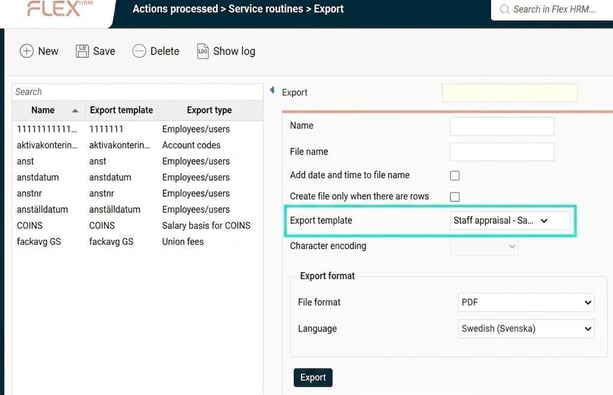
This is where you create the export routine itself. You set up the data selection in the report generator, but in the export settings you can choose:
-
File format (PDF, XLSX or CSV).
-
Language for the exported file (if you use multiple languages in Flex HRM).
Step 3: Schedule the run
After you have saved the export, you can schedule it. You do this under Scheduled task runs, just as you schedule other exports in the system. Read more about this in the article ⚙️Exports - How do we create and manage export templates to extract data from Flex HRM?
Related articles:

Report generator - What is the Report generator?
Report generator - How can I extract reports on staff appraisals from the report generator?
Please note: This article is AI-translated. This means that linguistic errors or misunderstandings may occur.