
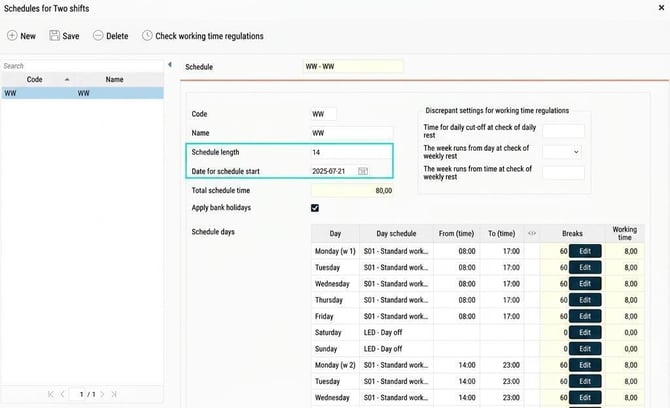
In public and personal schedules you create part schedules/schedule cycles where you define how the schedule should look. If you have a seven-day cycle, you specify schedules for Monday to Sunday. If there are more than seven days in the cycle, for example a schedule that runs across two weeks, you specify schedules for Monday to Sunday week 1 and Monday to Sunday week 2. You also need to specify a schedule start date, so that HRM knows which day falls where.
Example 1
The public schedule H2 (see image above) has a schedule with a schedule length of 14 days. Monday - Friday week 1 you work 08:00-17:00, week 2 the schedule is 14:00-23:00. Having the schedule start date set to 2025-07-21 means that schedule week 1 falls the same week as 2025-07-21, and continues from there.
Employee 5 is assigned the public schedule from 2025-07-28. This means he goes straight into week 2 of the schedule cycle.


The schedule start date therefore does not specify when the schedule starts to apply for employees, but is only used to define the weeks in the cycle, regardless of when the schedule is used.
Example 2, move schedule
Employee 4 and 5 are to take turns working days and evenings. Employee 5 uses the schedule in Example 1. We do not need to create a new public schedule for employee 4, but can use the same as employee 5. On the schedule row in the employee register, we specify that the schedule should be moved by one week. This means that the schedule start date is one week later for employee 4 than in the base public schedule. Employee 4 thus has the same schedule, but with schedule start date 2025-07-28, which means he starts on week 1 of the schedule cycle on 2025-07-28.


Good to know: In order to move a public schedule, all of its schedule cycles must have the same schedule length. Moving is not possible if the schedule alternates between, for example, a one-week cycle and a two-week cycle.
Related articles
How do you create a public schedule?
How do you create a personal schedule?
Please note: This article is AI-translated. This means that linguistic errors or misunderstandings may occur.