
The function Correct time report allows you to make changes to a time report that has already been audited or transferred to payroll. This is useful if, for example, you need to correct an account code in order to get accurate statistics in a report, without having to remove the audit or reverse the payroll transfer.
Settings for authorisations
|
Permissions to correct a timesheet can be set for different approval levels, as well as for timesheets that have been transferred to payroll or released for invoicing.
|
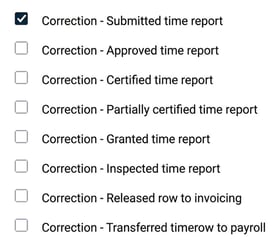
|
Reminder when making corrections
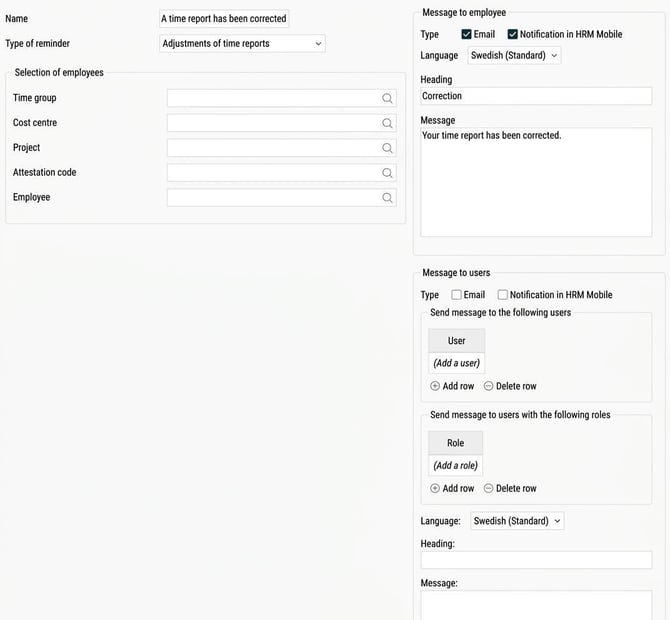
It is possible for a reminder to be sent out when a time report is corrected. The reminder, called Adjustments of time reports, can be sent to the following:
-
The employee concerned by the time report.
-
All users with a specific role for the employee.
-
A specific user.
If you, as in the image below, set the reminder to be sent to the employee by email and notification, he or she will receive an email and notification in HRM Mobile when a correction is saved in their time report.
Related
Can I make changes to a time report that is audited/transferred to payroll?
How do reminders work?
Roles and authorisations in Flex HRM
Please note: This article is AI-translated. This means that linguistic errors or misunderstandings may occur.